> For the complete documentation index, see [llms.txt](https://help.aikido.dev/llms.txt). Markdown versions of documentation pages are available by appending `.md` to page URLs; this page is available as [Markdown](https://help.aikido.dev/docs/docs-ja/zen-firewall/zen-features/tracking-ai-llm-usage-with-zen-firewall.md).
# Zen FirewallでAI / LLMの使用状況を追跡する
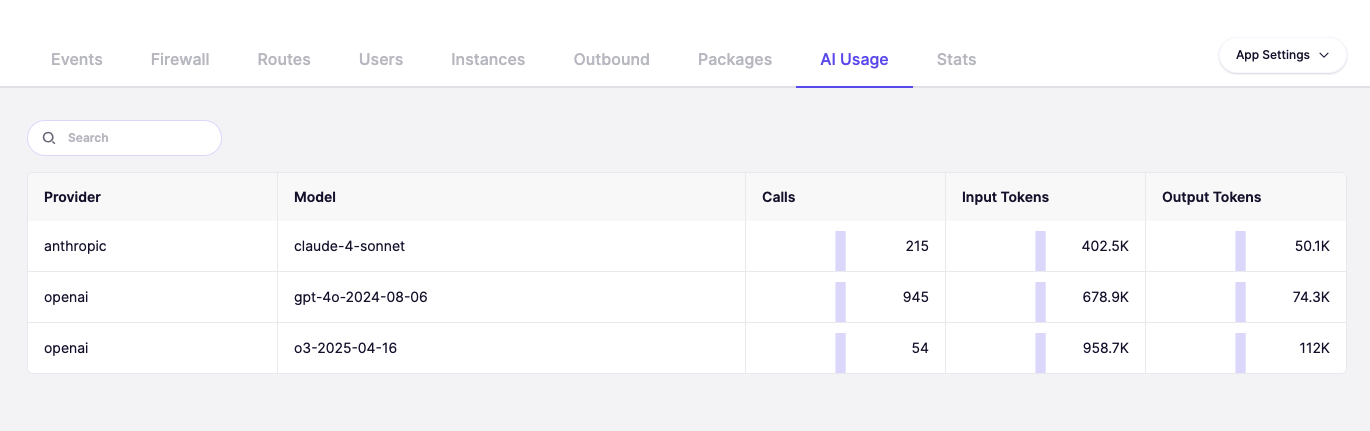
Aikido の Zen Firewall は、OpenAI、Anthropic などの主要プロバイダー全体で、AI / LLM API の使用状況を監視します。この機能は、モデルの使用状況、トークン消費量を追跡し、AI インフラの支出を理解し最適化するのに役立つコスト見積もりを提供します。各リクエストの入力トークンと出力トークンの両方、および使用された特定のモデルを追跡します。
{% hint style="warning" %}
コスト見積もりは標準価格に基づいており、LLM プロバイダーとの個別の割引は反映されません。
{% endhint %}
## ユースケース
* 📊 トークン使用量を監視:すべての LLM 呼び出しにわたる入力トークンと出力トークンを追跡
* 💰 コストを見積もる:API 使用量のリアルタイムなコスト見積もりを取得
* 🔍 モデルの使用状況を特定:どのモデルが最も頻繁に使用されているかを確認
* 📈 支出を最適化:LLM コストを削減できる機会を特定
* 🎯 プロバイダー別に追跡:OpenAI、Anthropic、その他のプロバイダー全体での使用状況を監視
* ⚡ 異常を検出:トークン消費量の異常な急増を見つける
### LLM の使用状況を表示する方法
特定のアプリを選択し、次に **ファイアウォール** タブ。"へ移動し、**AI 利用**"使用状況分析を表示します。
### AI 部品表(AIBOM)
Zen Firewall は、アプリケーションが通信するすべての AI および LLM サービスを一覧化した AI 部品表を生成できます。
この機能はリクエストに応じて利用可能です。有効化するにはサポートまでお問い合わせください。
---
# Agent Instructions
This documentation is published with GitBook. GitBook is the documentation platform designed so that both humans and AI agents can read, navigate, and reason over technical content effectively. Learn more at gitbook.com.
## Querying This Documentation
If you need additional information that is not directly available in this page, you can query the documentation dynamically by asking a question.
Perform an HTTP GET request on the current page URL with the `ask` query parameter, and the optional `goal` query parameter:
```
GET https://help.aikido.dev/docs/docs-ja/zen-firewall/zen-features/tracking-ai-llm-usage-with-zen-firewall.md?ask=&goal=
```
`ask` is the immediate question: it should be specific, self-contained, and written in natural language.
`goal` is optional and describes the broader end goal you are ultimately trying to accomplish on behalf of the user. GitBook uses it to tailor the answer towards what is most useful for that goal.
The response will contain a direct answer to the question and relevant excerpts and sources from the documentation.
Use this mechanism when the answer is not explicitly present in the current page, you need clarification or additional context, or you want to retrieve related documentation sections.