> For the complete documentation index, see [llms.txt](https://help.aikido.dev/llms.txt). Markdown versions of documentation pages are available by appending `.md` to page URLs; this page is available as [Markdown](https://help.aikido.dev/getting-started/core-functionalities/main-feed.md).
# Main Feed
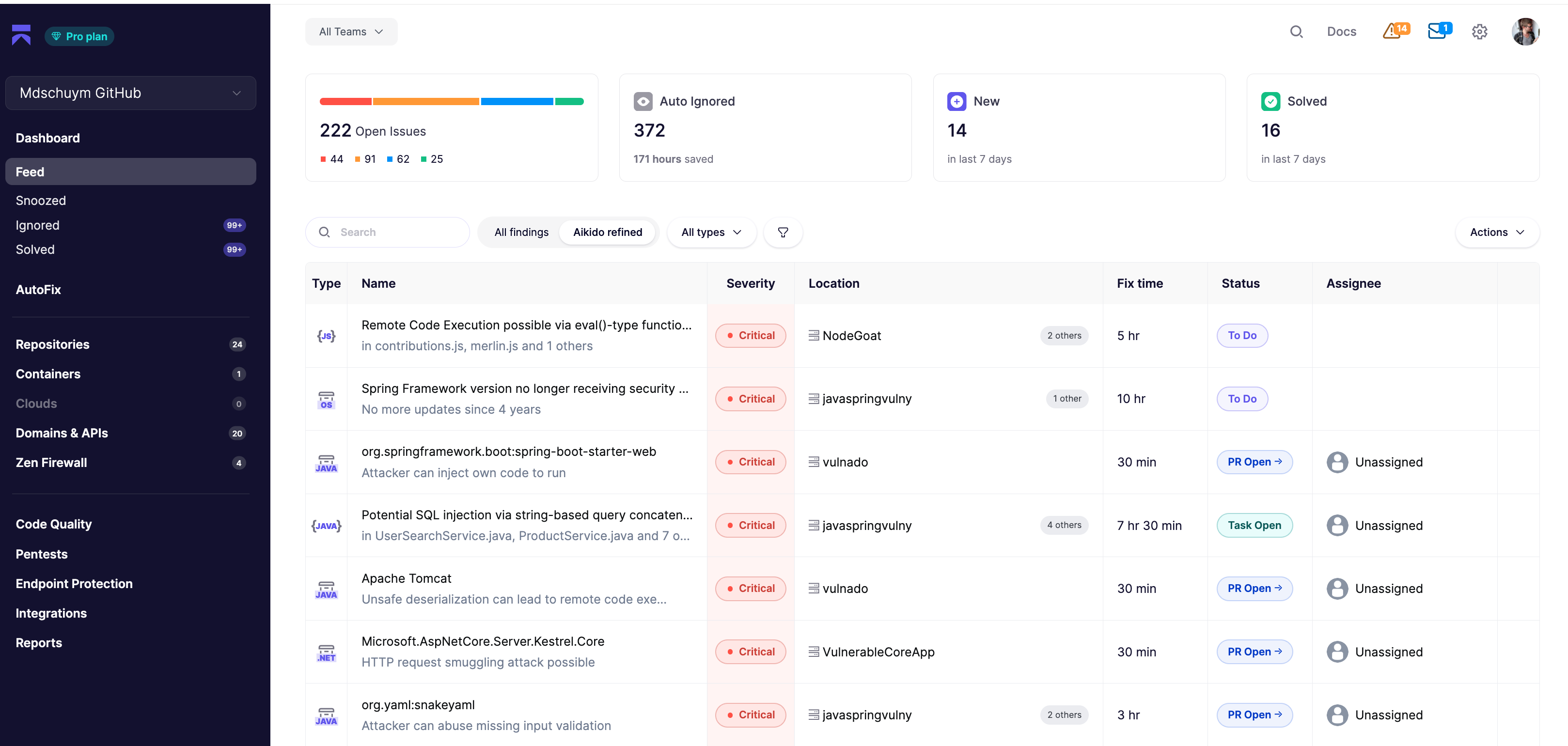
Aikido's Feed is meticulously designed to streamline security management: it groups similar issues for clarity, allows for customizable views to highlight what's currently important. The main feed focusses on open issues only. Snoozed and ignored issues are accessible on a separate page for a clean giving a focused and clean overview.
### Aikido's Main Feed
The **Feed** is the central hub for monitoring and managing security issues. A similar view can be found all over Aikido when going into details of repositories, clouds and domains.
By default, Aikido enables the **Focus** view, containing all issues that are important to follow-up. By toggling to **All** we will also show issues that have been auto-triaged and ignored.
*Status Column*
Shows the status of the particular issue.
* *New*: issues that have been around for less than 7 days
* *To Do:* all other issues that are still unresolved
* *Task Open:* only when a task manager is linked
* *PR Open:* clicking will take you to PR / branch scan overview.
### Sidebar
Aikido's Feed is equipped with a detailed sidebar, designed to provide users with comprehensive information and actionable options for each security issue. The image below shows the main important actions one can take.
**#1 Group Actions:** these are actions that can be taken on group level of an issue.
**#2 Subissue Actions:** you can also take actions on a subissue separately. This can be important when certain subissues want to be snoozed or ignored, but the overall issue group should remain in the main feed.
**#3 Reachability Analysis:** visualizes accessible code paths for that specific issue.
**#4 Detail Screen**: Separate detail screen with even more information (e.g., CVE information).

**Reachability Analysis**

### Filter Issues
You can easily adjust the view in order to filter on those issues that are most important to you in the moment. These filters can be found above the issue table in every feed view. You can filter on
* **Issue Type**
* **Predefined filtered views**
* If you are using the [**SLA functionality**](https://help.aikido.dev/en/articles/8926339-enabling-slas-in-aikido), you will be able to see all upcoming and out of SLA issues

### Export Issues to CSV or PDF
You can export a CSV or PDF of issues. You can configure which issues to export exactly. This can be triggered from the Actions menu in the top right.

### Show issues per team or project
**Aikido's Feed** features a **team filter** at the top of the page. This filter allows users to tailor the feed to display only the issues relevant to selected teams ([📖 Set Up Teams](https://help.aikido.dev/en/articles/9005606-using-teams-for-repository-and-user-management)).

---
# Agent Instructions
This documentation is published with GitBook. GitBook is the documentation platform designed so that both humans and AI agents can read, navigate, and reason over technical content effectively. Learn more at gitbook.com.
## Querying This Documentation
If you need additional information that is not directly available in this page, you can query the documentation dynamically by asking a question.
Perform an HTTP GET request on the current page URL with the `ask` query parameter, and the optional `goal` query parameter:
```
GET https://help.aikido.dev/getting-started/core-functionalities/main-feed.md?ask=&goal=
```
`ask` is the immediate question: it should be specific, self-contained, and written in natural language.
`goal` is optional and describes the broader end goal you are ultimately trying to accomplish on behalf of the user. GitBook uses it to tailor the answer towards what is most useful for that goal.
The response will contain a direct answer to the question and relevant excerpts and sources from the documentation.
Use this mechanism when the answer is not explicitly present in the current page, you need clarification or additional context, or you want to retrieve related documentation sections.