
Threat Model
The Threat Model appears on the assessment detail page once your assessment has started and the discovery phase is finished. It's available for both Aikido Pentest and Code Audit, and provides a transparent, real-time view of how our agents perceive and test your application's security posture.
#Prerequisites
Your code repositories must be linked in the pentest or Code Audit.
#Recon Report
The Recon Report is a high-level summary of what was discovered during the initial discovery phase. It provides a readable overview of your application's attack surface, helping you understand the "attacker's view" before reviewing specific exploit attempts.
It gives you a quick view of the application's attack surface, including:
- Endpoints
- Technologies in use
- Authentication mechanisms
- Areas of interest for further testing
Use this report to identify and decommission unnecessary exposed assets or to verify that your intended security controls are visible to the scanner.
This also includes a diagram of your application's architecture, roles, and trust boundaries, so you can see the full picture at a glance.
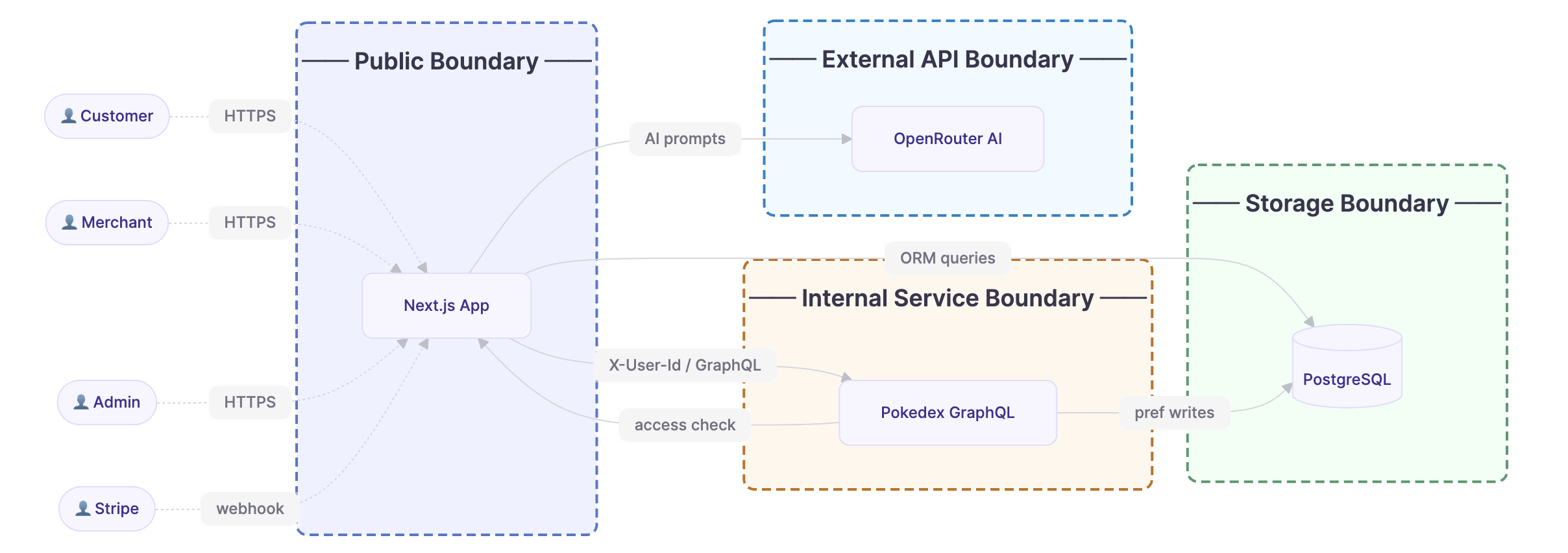
Example architecture diagram that is included in the recon report
#Attack Plan
The Attack Plan is a structured table of the specific attack vectors for your application. Each row represents a targeted test focused on a specific code snippet or a particular architectural vulnerability hypothesis.
Every entry shows:
- Starting assumption: what the agent is testing, plus the targeted file or endpoint
- Type: the vulnerability category being tested, such as injection or authentication bypass
- Agent: the specific attacker agent assigned to the task
- Status: the current state of the attack
- Not Started - the agent has not begun yet
- In Progress - the agent is actively running
- Exploitable - the agent found an exploitable issue
- No issues found - the agent completed without finding vulnerabilities
- Stopped - the agent was cancelled