> For the complete documentation index, see [llms.txt](https://help.aikido.dev/llms.txt). Markdown versions of documentation pages are available by appending `.md` to page URLs; this page is available as [Markdown](https://help.aikido.dev/pentests/integrate-your-supabase-projects.md).
# Integrate your Supabase Projects
By connecting your Supabase organization to Aikido, our pentest agents get deeper context about your setup, helping them uncover security issues that could otherwise go unnoticed.
{% hint style="warning" %}
By running a pentest, agents will try to find vulnerabilities in your application and will need to interact with it. This might result in test data being created in your Supabase project.
{% endhint %}
## What is covered in a Supabase pentest?
With the Supabase integration, Aikido reviews your Supabase project configuration and gives our pentest agents the context they need to find more hidden security issues.
The following areas are tested:
* **RLS policies:** These decide who can view or change data. If they are misconfigured, private customer or business data can become accessible to the wrong users.
* **Storage buckets:** These often contain sensitive uploads, documents, images, or exports. A small configuration mistake can make sensitive files public without you realizing it.
* **Edge Functions:** These often handle important backend logic, such as payments, account actions, or integrations. If they are not properly protected, attackers may be able to abuse that logic or access data behind it.
* **PostgREST exposure:** Supabase can expose database data through APIs. This needs to be checked so only the intended data and actions are reachable.
* **Auth configuration:** Login and signup settings are what protect user accounts. Weak settings can make account abuse, fake signups, or unauthorized access possible.
* **Realtime:** Realtime features send live updates to users. If access is too broad, private data can be exposed through updates sent to the wrong users.
* **Service and anon key exposure:** Keys allow your app to connect to Supabase. When exposed in the wrong place, they can give attackers a way to misuse your project.
* **Database configuration:** Public schema exposure and dangerous extensions can accidentally open up sensitive parts of your database. Testing this helps catch risky settings before attackers can use them to access data.
## Connect Supabase and run a pentest
Connecting Supabase uses an OAuth authorization flow. Aikido is granted access to the Supabase organization you select during the flow, and you can revoke that access at any time from Supabase.
{% stepper %}
{% step %}
**Select Supabase as the application type**
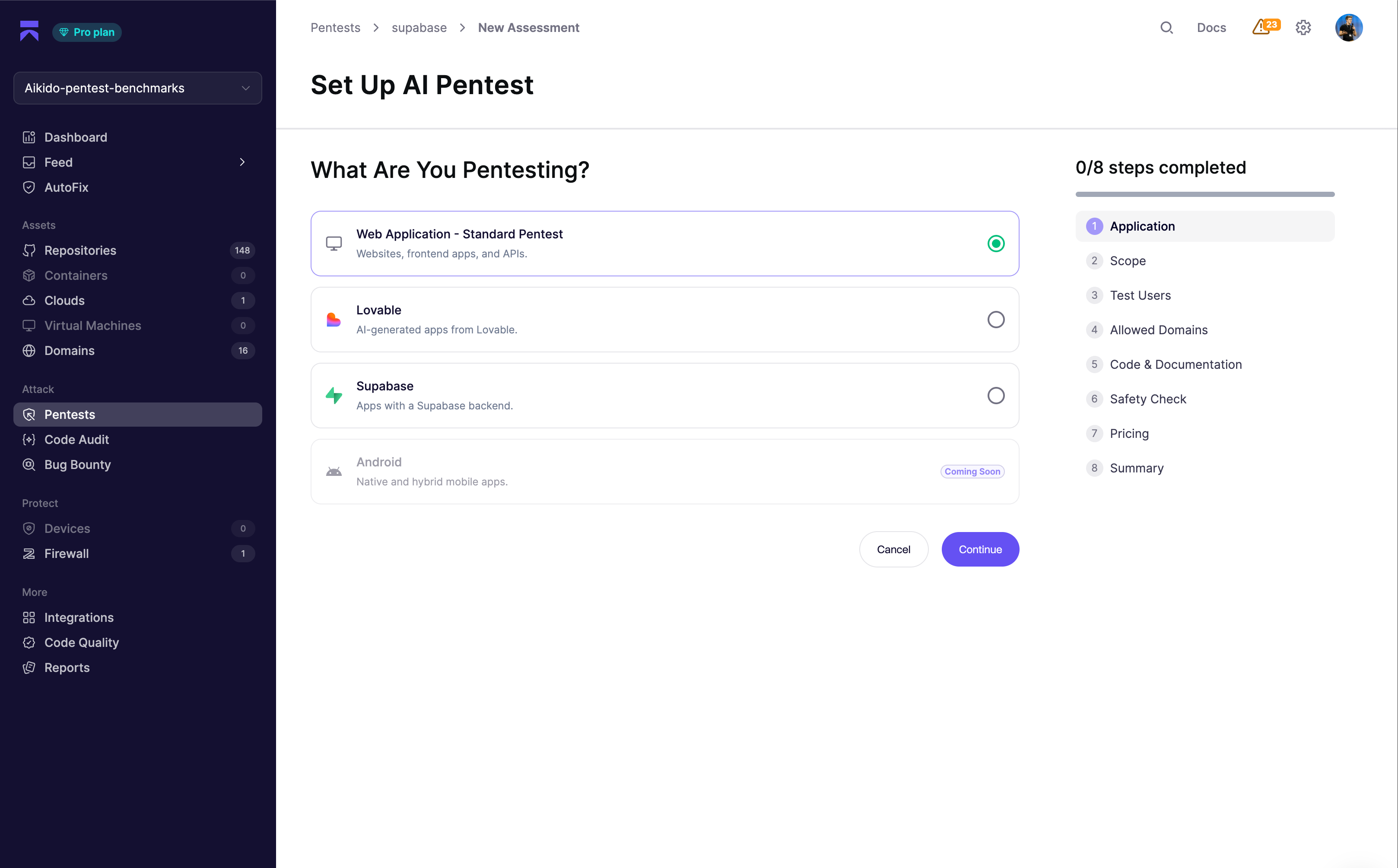
In Aikido, open your pentest project and click **Create Assessment**. On the **Application** step, choose **Supabase** as the type of application you want to pentest.
{% endstep %}
{% step %}
**Define your scope and start the Supabase connection**
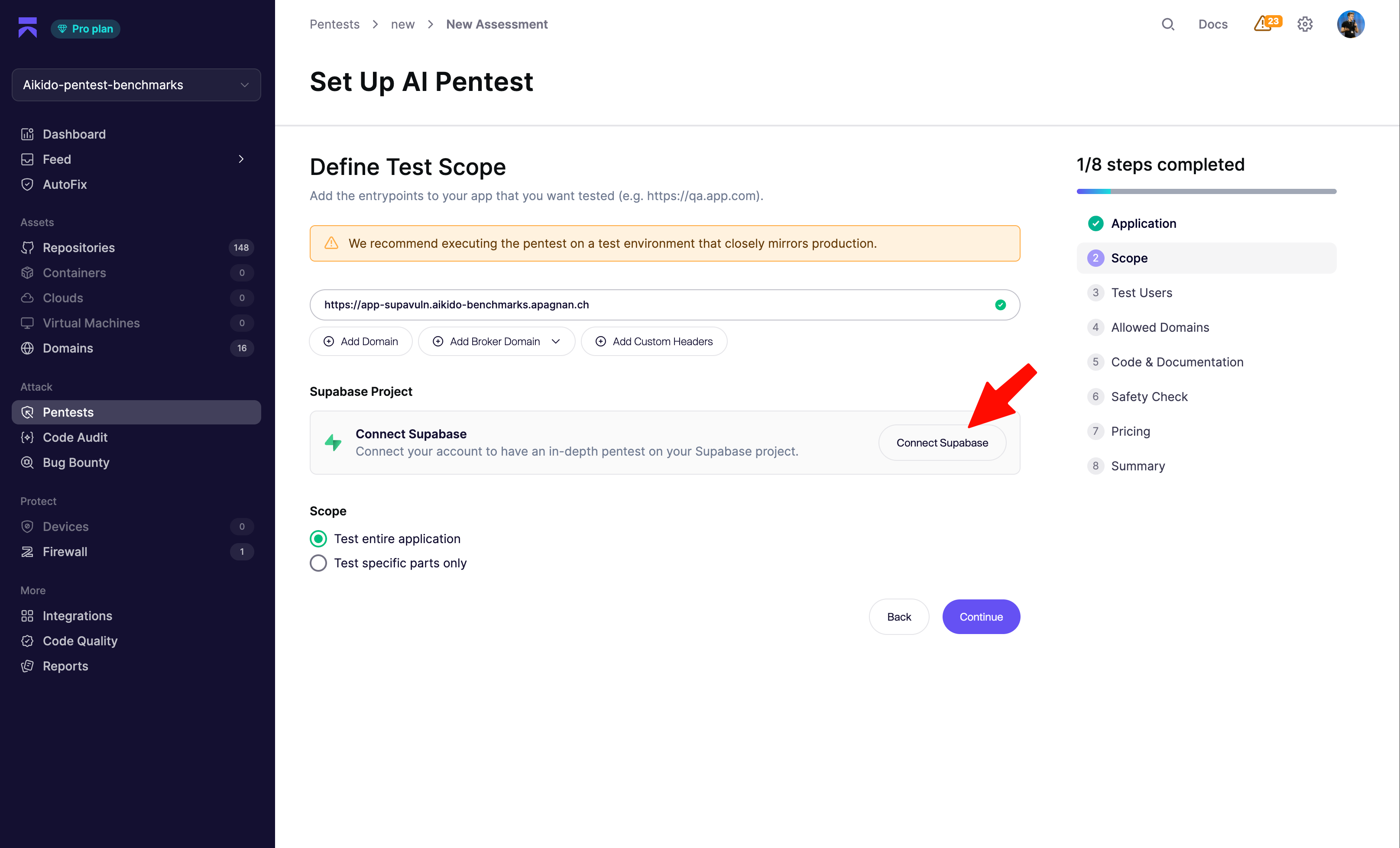
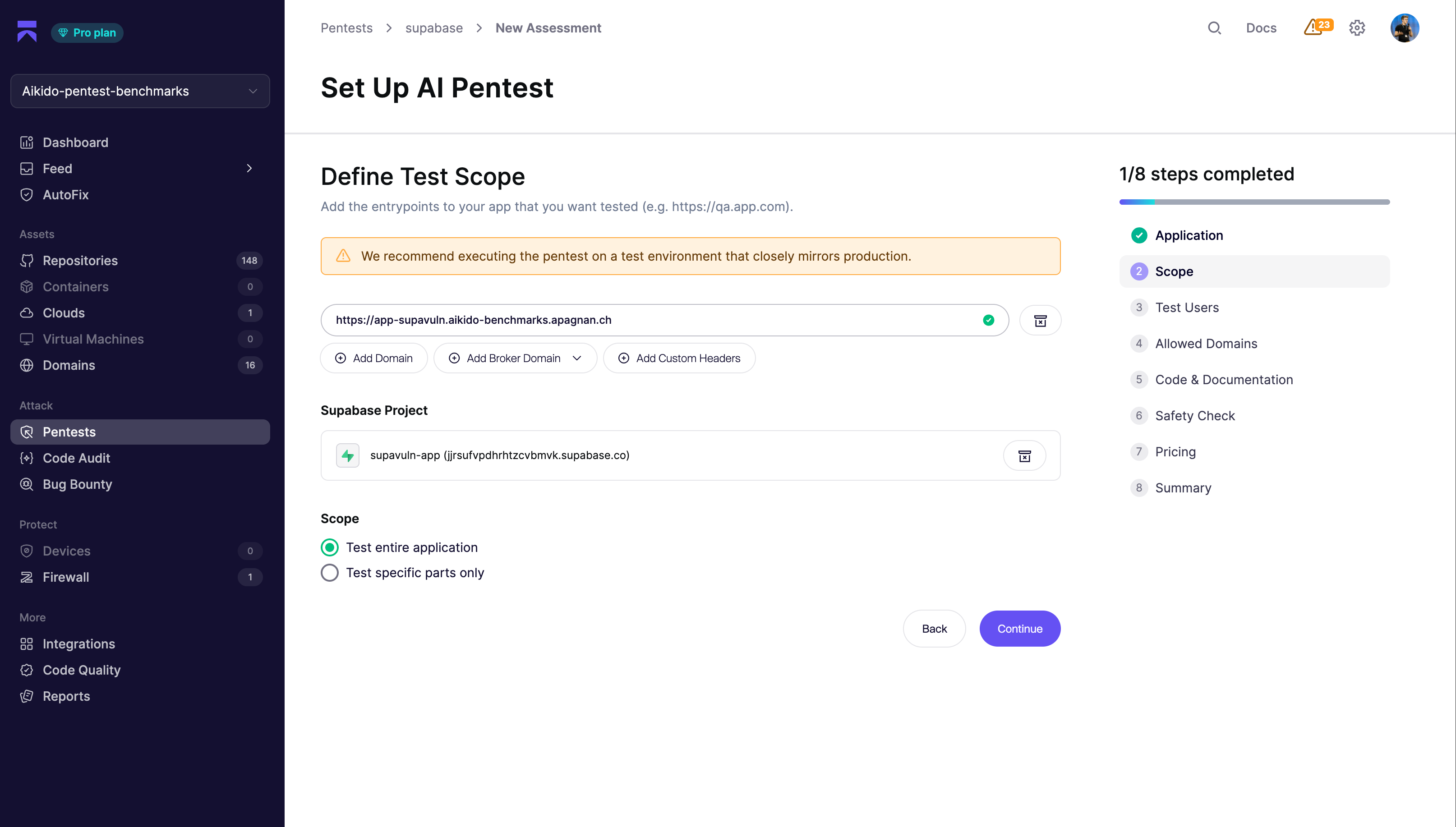
Add the entry point of the application built on top of your Supabase project. This should be the URL of your application, not your Supabase URL.
Aikido uses the application entry point to test your Supabase configuration the way real attackers would. This gives the agents the context of your application and business flows, helping them determine whether specific configurations are intentional or potentially risky.
We recommend running pentests against a test environment that closely mirrors production.
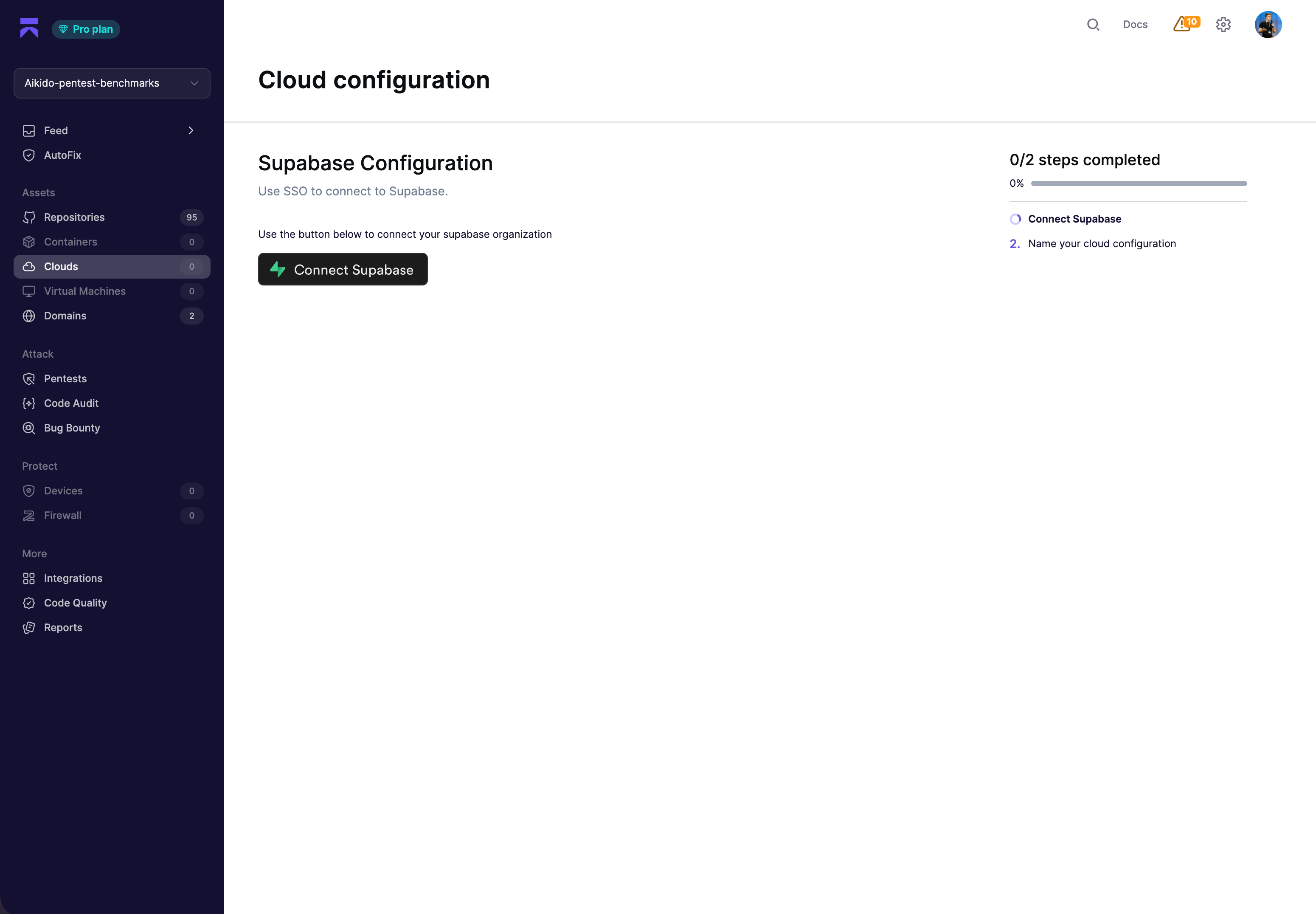
In the **Supabase Project** section, click **Connect Supabase** to start the OAuth flow.
{% endstep %}
{% step %}
**Authorize Aikido on Supabase**
You'll be redirected to Supabase, where you can review the requested permissions and pick which organization to grant access to.
Approve the authorization. Aikido receives a short-lived authorization code and exchanges it for a refresh token used to list your projects. No Personal Access Token needs to be created or stored.
{% endstep %}
{% step %}
**Name your cloud configuration**
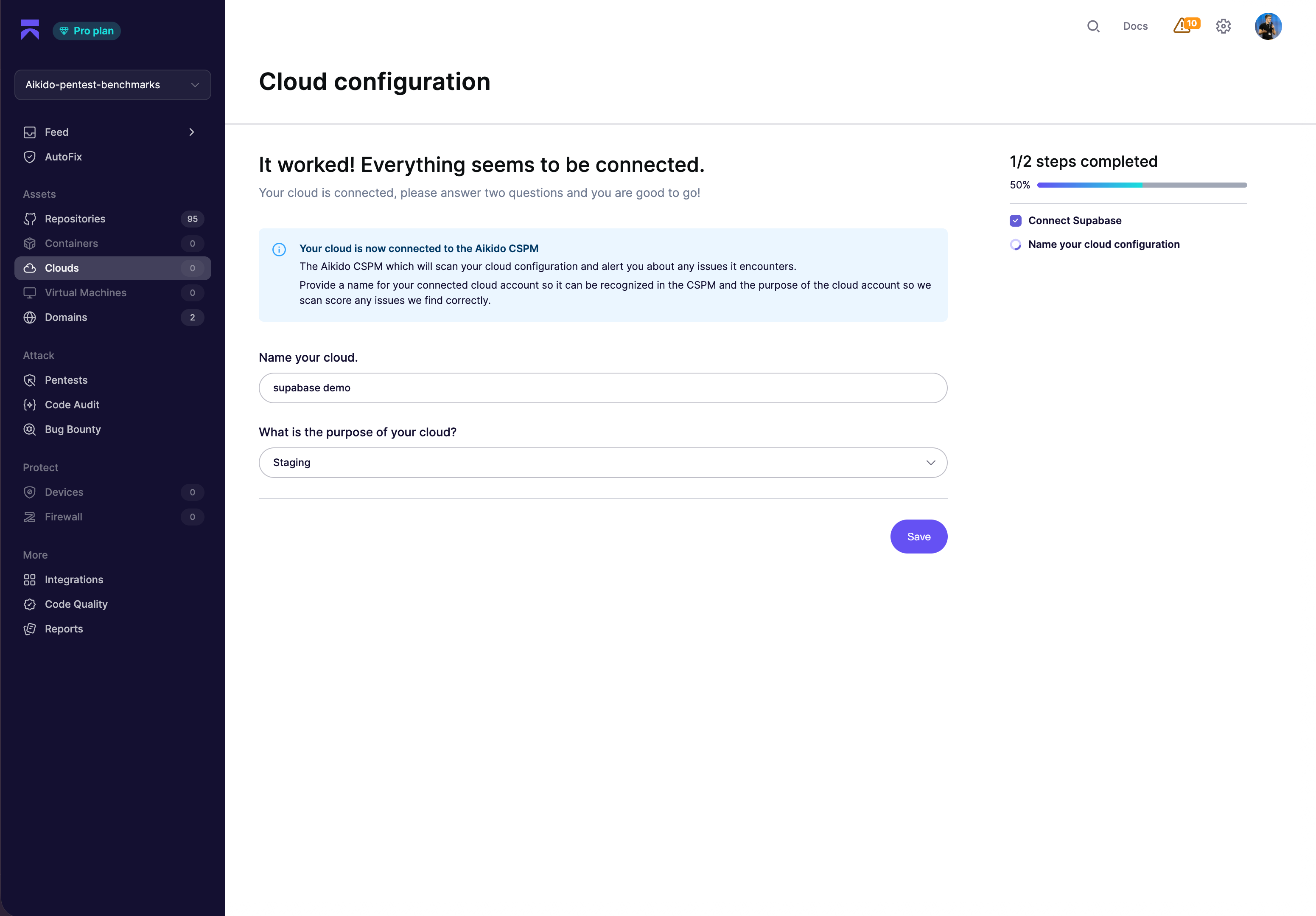
Back in Aikido, give the connected Supabase organization a name and select the environment it represents (production, staging, etc.). This helps Aikido prioritize findings based on severity and business impact.
{% endstep %}
{% step %}
**Select your Supabase project**
Aikido sends you back to the **Scope** step. Pick the project you want to test from the **Add Project** dropdown. Aikido automatically adds the project's Supabase domain (or your custom domain, if configured) to the pentest scope.
{% endstep %}
{% step %}
**Complete the rest of the setup**
Go through the remaining steps of the assessment flow in Aikido. The most important parts are adding test users (so Aikido can reach authenticated areas of your app) and reviewing the discovered domains.
For each section, see:
* [How to Setup a Pentest](/pentests/configure-a-pentest/starting-an-assessment.md) - overview of the full setup flow
* [Setting Up Test Users](/pentests/configure-a-pentest/setting-up-authenticated-testing.md) - add test users and roles for deeper coverage
* [Scope of Assessment](/pentests/configure-a-pentest/scope-of-assessment.md) - mark domains as attackable or accessible
* [Leveraging Code and Documentation](/pentests/configure-a-pentest/leveraging-code-and-documentation.md) - link repositories so agents can reason about RLS policies and Edge Functions
* [Safety Measures](/pentests/configure-a-pentest/safety-measures.md) - review the safety check before running
If you haven't already verified ownership of your Supabase domain for this pentest project, follow [Supabase domain verification](/pentests/configure-a-pentest/domain-verification/supabase.md).
{% endstep %}
{% step %}
**Choose the pentest**
On the **Pricing** step, select the pentest type that fits your needs:
* **Supabase Test** - targeted pentest focused on uncovering vulnerabilities in your Supabase project.
* **Standard** - standard pentest of your application that also includes the Supabase Test.
* **Rightsized** - full pentest of your application that sizes with the size of your application. This also includes the Supabase Test.
{% endstep %}
{% step %}
**Launch the pentest**
Everything is configured. Click **Launch Pentest** to kick off the assessment.
{% endstep %}
{% endstepper %}
---
# Agent Instructions
This documentation is published with GitBook. GitBook is the documentation platform designed so that both humans and AI agents can read, navigate, and reason over technical content effectively. Learn more at gitbook.com.
## Querying This Documentation
If you need additional information that is not directly available in this page, you can query the documentation dynamically by asking a question.
Perform an HTTP GET request on the current page URL with the `ask` query parameter, and the optional `goal` query parameter:
```
GET https://help.aikido.dev/pentests/integrate-your-supabase-projects.md?ask=&goal=
```
`ask` is the immediate question: it should be specific, self-contained, and written in natural language.
`goal` is optional and describes the broader end goal you are ultimately trying to accomplish on behalf of the user. GitBook uses it to tailor the answer towards what is most useful for that goal.
The response will contain a direct answer to the question and relevant excerpts and sources from the documentation.
Use this mechanism when the answer is not explicitly present in the current page, you need clarification or additional context, or you want to retrieve related documentation sections.