
Proxy & Load Balancer Settings
Proxy & Client's IP address
We'll automatically use the x-forwarded-for header to determine the client's IP address when behind a proxy.
If you're publicly exposing your server without a load balancer in front of it, you should set the AIKIDO_TRUST_PROXY env var to false to ensure that the correct IP address is used. Otherwise, someone could potentially spoof their IP address by adding the above header and thus bypassing the rate limiting.
If you need to use a different header to determine the client's IP address, you can set the AIKIDO_CLIENT_IP_HEADER environment variable to the name of that header. This will override the default x-forwarded-for header:
# Example for DigitalOcean App Platform
AIKIDO_CLIENT_IP_HEADER=do-connecting-ip node app.js
In Ruby, use the Rack environment key instead of the header name. For example, use HTTP_FLY_CLIENT_IP for the Fly-Client-IP header.
Rate limiting & Load balancers
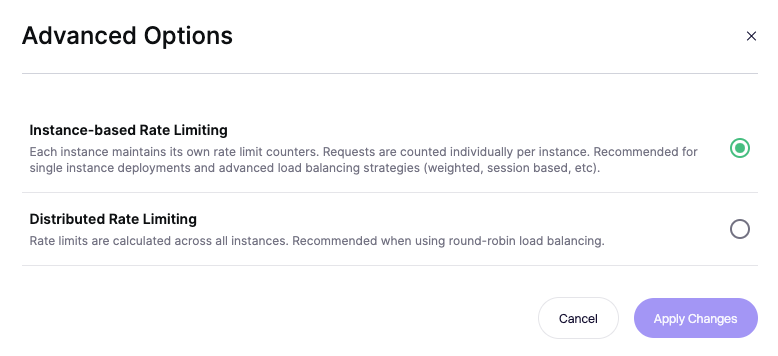
By default each Zen instance will maintain its own rate limit counters. This means when you have 3 instances of an application, and set the rate limit to 10 per minute, the customer in theory could send 30 requests (10 per server).
In the case of round robin load balancing Aikido can calculate rate limits based on the number of instances. In the example above it would mean that the customer is able to send a maximum of 10 request as configured.
You can find this option under "Advanced Options" under the "Routes" tab when looking at a specific Zen app.
Additional configuration for ASP.NET Core
ASP.NET core will not automatically pick up x-forwarded-for without additional configuration. For more details check out the Microsoft docs.