> For the complete documentation index, see [llms.txt](https://help.aikido.dev/llms.txt). Markdown versions of documentation pages are available by appending `.md` to page URLs; this page is available as [Markdown](https://help.aikido.dev/code-scanning/scanning-practices/multifile-vulnerability-tracing.md).
# Multi-File / Cross-File Vulnerability Tracing
**Taint analysis** is a way to find security risks in code by following how data moves through a program. It starts with “tainted” input that comes from outside the system, like a web request or user form. The analysis then traces where that data goes to see if it reaches sensitive parts of the code, such as database queries or system commands, without being checked or cleaned first. If the data could be misused along the way, Aikido flags it as a possible vulnerability. Taint analysis helps developers see how untrusted input can travel through their software and cause real-world security issues if not properly handled.
Aikido tracks the flow of untrusted code and flags it when it reaches a dangerous sink (for example, SQL or command execution). We support taint analysis both within a file and across files, as input accepted in one place can be linked to a risky operation in another.
On top of data flow, Aikido also checks [reachability](/getting-started/reachability-analysis/reachability-engine-to-remove-false-positives.md) so you don’t get pinged for issues that can’t actually execute in your app (for example, a vulnerable function you don’t call, or code that only runs in tests). This is part of how we keep noise down.
### Taint tracing in Aikido
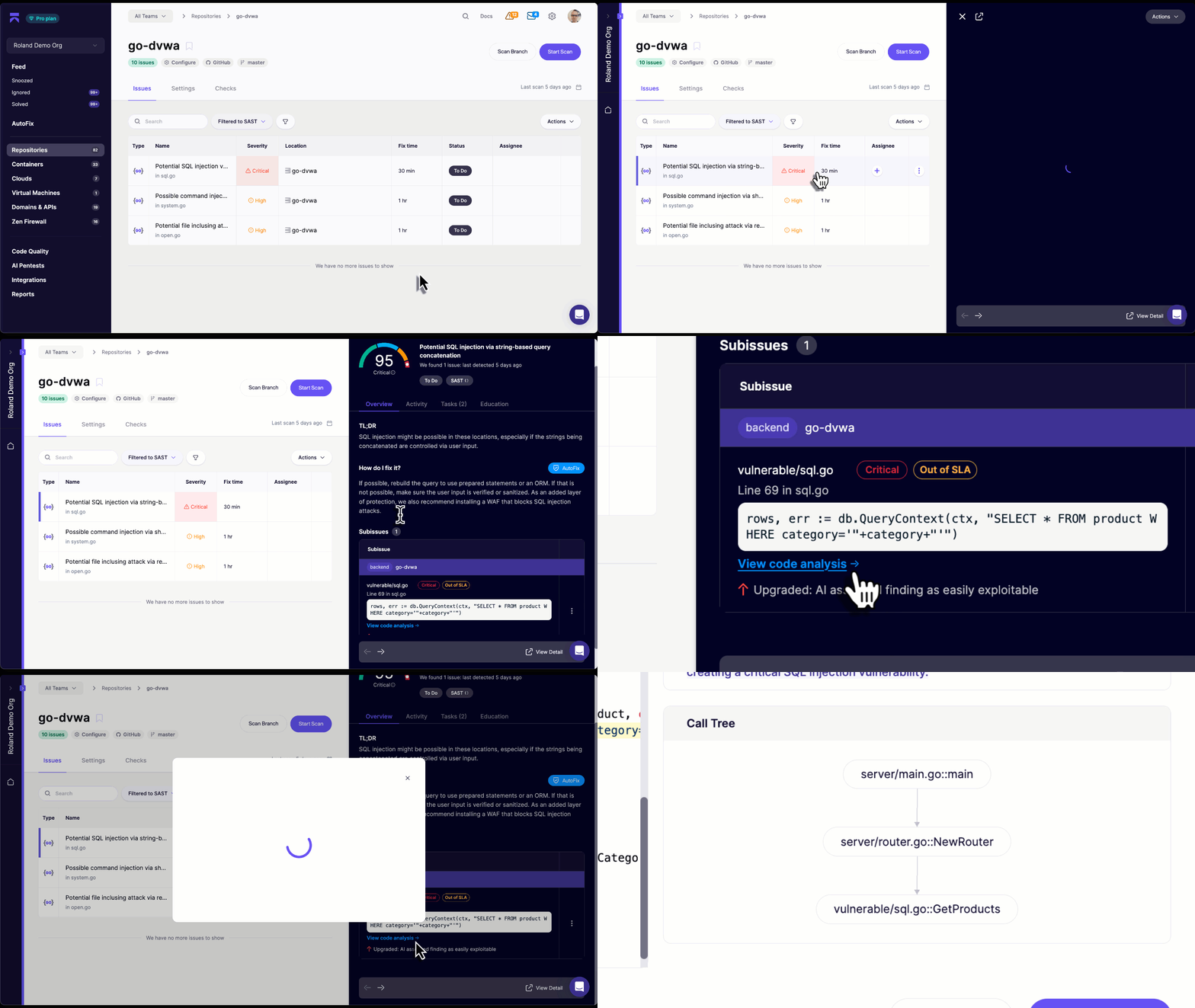
When a vulnerability is discovered, Aikido will trace it through the relevant function calls. When you open a security issue, select **View code analysis** to get a detailed look at the source of the vulnerability as well as a call graph illustrating the execution flow.
### Where multi-file taint analysis is available
Aikido currently supports cross-file taint tracking for the following languages:
* JavaScript
* TypeScript
* PHP
* .NET/C#
* Java
* Rust
* Go
* Ruby
* Python
Other languages currently support intra-file taint analysis:
* C/C++
* Swift
* Android
* Scala
* Kotlin
* Dart
* Elixir
---
# Agent Instructions
This documentation is published with GitBook. GitBook is the documentation platform designed so that both humans and AI agents can read, navigate, and reason over technical content effectively. Learn more at gitbook.com.
## Querying This Documentation
If you need additional information that is not directly available in this page, you can query the documentation by asking a question.
Perform an HTTP GET request on the following URL with the `ask` and `goal` query parameters:
```
GET https://help.aikido.dev/code-scanning/scanning-practices/multifile-vulnerability-tracing.md?ask=&goal=
```
`ask` is the immediate question: it should be specific, self-contained, and written in natural language.
`goal` is what the user is ultimately trying to achieve, the reason they need the answer. Sharing it helps GitBook give you a better, more relevant answer. A goal is most helpful when it describes the outcome the user wants rather than restating the question. For example, with `ask=how do I create an API token`, a goal like `automate deployments from our CI pipeline` lets GitBook tailor the answer to that use case.
The response will contain a direct answer to the question and relevant excerpts and sources from the documentation.
Use this mechanism when the answer is not explicitly present in the current page, you need clarification or additional context, or you want to retrieve related documentation sections.