> For the complete documentation index, see [llms.txt](https://help.aikido.dev/llms.txt). Markdown versions of documentation pages are available by appending `.md` to page URLs; this page is available as [Markdown](https://help.aikido.dev/getting-started/core-functionalities/how-is-severity-score-calculated.md).
# How is Severity Score Calculated
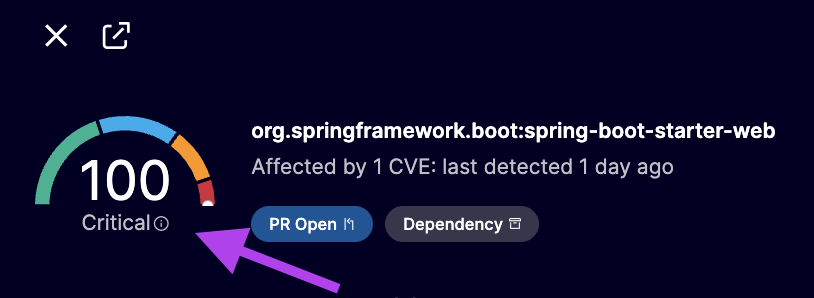
Aikido provides a contextual, risk-based severity score from 0 to 100, offering 10× more granularity than traditional CVSS scoring (which is on a 0–10 scale). This allows for better prioritization and filtering.
Severity
Score
Critical
90 - 100
High
70 - 89
Medium
40 - 69
Low
1 - 39
### 1. Multiple Vulnerability Data Sources
We continuously monitor a variety of vulnerability feeds and databases, that provide baseline severity information and help establish initial severity scores. Databases include:
* Public vulnerability databases (e.g., NVD, GHSA,... | [See full list](https://help.aikido.dev/code-scanning/scanning-practices/external-vulnerability-databases-used-in-our-sca-engine))
* Operating system and vendor-specific advisories
* Our own Aikido Intel:
### 2. Contextual Severity Adjustments
To reflect actual risk more accurately, Aikido layers in additional context such as exploitability, environment, threat intelligence, and custom rules.
**Exploitability & Threat Intelligence:**
Severity can increase when there’s evidence of real-world risk:
* The vulnerability is actively exploited or appears on the CISA KEV list
* A public PoC exploit is available (e.g., on GitHub)
#### Business Context
Severity is adjusted based on the importance of the affected asset. Some example are:
* Production vs test environments
* Backend vs frontend code
* Whether the vulnerable code is reachable or executed
#### Customer Rules
You can further refine issue scoring by adding contextual information to your project
* Learn how you can improve the risk score for repositories and containers [here](/code-scanning/miscellaneous/improve-risk-scoring-for-repositories-and-containers.md)
#### Exploit Prediction (EPSS)
Aikido also supports EPSS-based prioritization to automatically downgrade or ignore vulnerabilities that are unlikely to be exploited in the next 30 days. This is optional and turned off by default, more info here: [Exploit Intelligence with KEV and EPSS](/code-scanning/miscellaneous/use-epss-values-to-further-reduce-noise.md)
{% hint style="success" %}
You can click the score to view a detailed breakdown of why this issue received this severity rating
{% endhint %}
---
# Agent Instructions
This documentation is published with GitBook. GitBook is the documentation platform designed so that both humans and AI agents can read, navigate, and reason over technical content effectively. Learn more at gitbook.com.
## Querying This Documentation
If you need additional information that is not directly available in this page, you can query the documentation dynamically by asking a question.
Perform an HTTP GET request on the current page URL with the `ask` query parameter, and the optional `goal` query parameter:
```
GET https://help.aikido.dev/getting-started/core-functionalities/how-is-severity-score-calculated.md?ask=&goal=
```
`ask` is the immediate question: it should be specific, self-contained, and written in natural language.
`goal` is optional and describes the broader end goal you are ultimately trying to accomplish on behalf of the user. GitBook uses it to tailor the answer towards what is most useful for that goal.
The response will contain a direct answer to the question and relevant excerpts and sources from the documentation.
Use this mechanism when the answer is not explicitly present in the current page, you need clarification or additional context, or you want to retrieve related documentation sections.