> For the complete documentation index, see [llms.txt](https://help.aikido.dev/llms.txt). Markdown versions of documentation pages are available by appending `.md` to page URLs; this page is available as [Markdown](https://help.aikido.dev/cloud-scanning/kubernetes-cluster-scanning/kubernetes-in-cluster-image-scanning.md).
# Kubernetes In-Cluster Image Scanning
This page describes how Aikido can scan container images within the Kubernetes cluster where they are deployed.
{% hint style="info" %}
This functionality is available only for **Pro** and **Advanced** plans. **Contact us** via chat for more information.
{% endhint %}
The Aikido Kubernetes integration supports scanning container images in your Kubernetes clusters without connecting the container registry to Aikido.
## Benefits of In-Cluster Image Scanning
* **Complete coverage** of all images deployed on a cluster, including public images.
* **Real-time scanning**: whenever a pod is launched with a new image, Aikido scans it, and any findings end up in your Aikido feed within minutes.
* **Images never leave your environments**: the Aikido agent only reports SBOMs back to the platform.
* **Less bandwidth**: the Aikido agent first tries to use images cached on the Kubernetes nodes, falling back to pulling them from the registry only if it cannot find or access them. This aspect is especially relevant for organizations using container registries that charge based on traffic.
## Getting Started
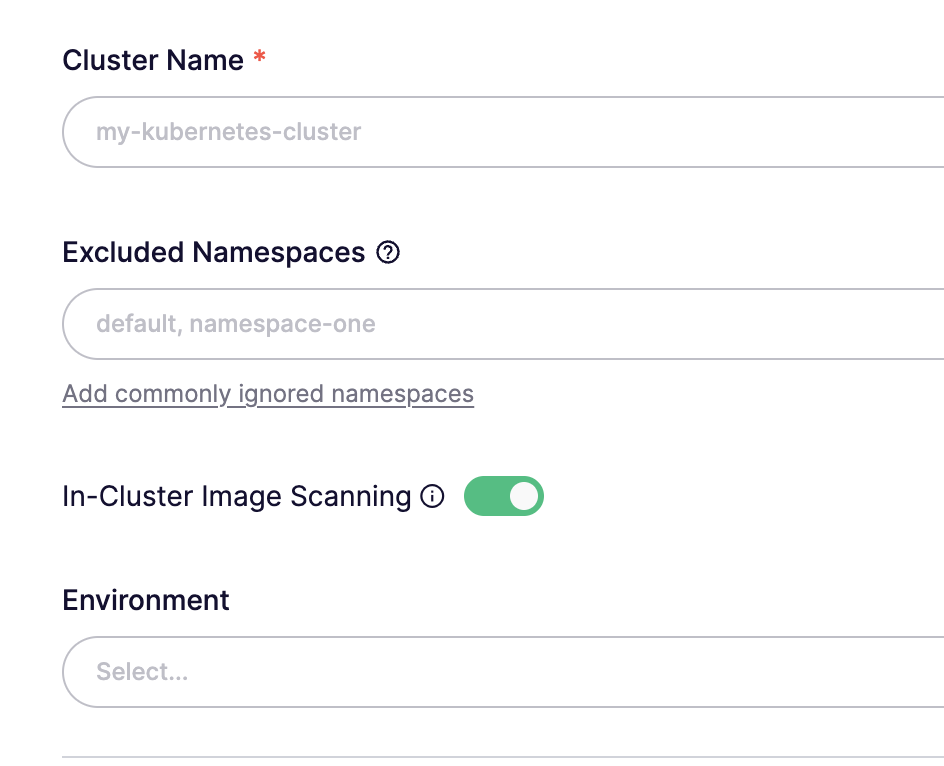
You can enable image scanning during the Kubernetes cluster onboarding
Kubernetes cluster onboarding with image scanning enabled
It will also require setting the `sbomCollector.enabled=true` value when installing the Helm chart.
Once running, you will see the images in Aikido on [the containers page](https://app.aikido.dev/containers).
Containers reported in Aikido
#### Choose an image scan behavior
{% hint style="info" %}
The scan behavior is relevant if you run multiple versions/tags of the same image (e.g., `busybox:1.37` and `busybox:1.36`) in your cluster.
{% endhint %}
When enabling in-cluster image scanning, you can choose how Aikido tracks running images:
* **Scan one tag per image that is running**
This is the simpler option. Choose it if you want Aikido to keep a single container per image repository in the cluster. If multiple tags of the same image are running, Aikido will track one container for that image and scan the most recently deployed version/tag.
* **Scan all running image tags**
Choose this option if you want Aikido to track running images per Kubernetes workload. If the same image is deployed with different tags across multiple workloads, each tag will appear as a separate container in Aikido.
You can configure the scan behavior during Kubernetes cluster onboarding, and update it later in the cluster settings.
### How Images Are Pulled
The agent (aka the SBOM collector) will attempt to pull images from the local node cache (this is why, by default, it runs as a DaemonSet as root user, allowing it to mount the containerd and Docker sockets).
If the SBOM collector cannot find the images from the node cache (or cannot mount the runtime sockets), it pulls the images from the corresponding registry. For accessing private registries, it supports most authorization mechanisms (node IAM role, imagePullSecrets, workload identity). For more details and how to configure access (where necessary), see [the Helm chart README](https://github.com/AikidoSec/helm-charts?tab=readme-ov-file#in-cluster-image-scanning).
{% hint style="info" %}
**SBOM Collector Secrets Access**
By default, the SBOM collector has access to all secrets from the cluster. This is strictly to allow access when `imagePullSecret` is used. You can [specify the name of the secrets](https://github.com/AikidoSec/helm-charts/blob/main/kubernetes-agent/values.yaml#L75) containing the registry access credentials, thus minimizing the access granted to the SBOM collector.
{% endhint %}
## FAQs
* **What happens when I deploy a new version/tag of an image?**
It depends on the selected image scan behavior.
If you use `Scan one tag per image that is running`, Aikido keeps a single container per image repository in the cluster. When a newer tag of the same image is deployed, Aikido updates that tracked container to the most recently deployed version.
If you use `Scan all running image tags`, Aikido tracks images per Kubernetes workload. When one workload moves from `busybox:1.32` to `busybox:1.33`, Aikido updates and scans the corresponding Aikido container, while other workloads running different tags continue to appear as separate containers.
* **Does this form of scanning benefit from the other container-related features Aikido offers?**
Yes. Images scanned using the in-cluster scanning benefit from all the features offered by Aikido, such as noise reduction, linking to repos, AutoFix, and Aikido Images.
* **Can I ignore specific images?**
The in-cluster scanning will respect the excluded namespaces you set during the cluster onboarding. If you need to exclude specific images from a scanned namespace, we recommend [deactivating the container in Aikido](https://app.aikido.dev/settings/container-image-registry).
* **Aikido keeps creating task tracker tickets for containers that no longer exist. What should I do?**
This can happen if your deployment process involves creating new Kubernetes Deployments (instead of updating the image on existing ones) or if you run frequent Kubernetes Jobs (that are not managed by a CronJob)
For such cases, the `Scan one tag per image that is running` scan behavior provides a cleaner inventory by keeping a single container per image repository, thus avoiding opening and closing tickets.
This is also common in OpenShift clusters, where many workloads may use different tags from the same image repository, such as `openshift/release`.
* **Can I see container issues only for specific Kubernetes namespaces?**
Yes. Aikido surfaces the Kubernetes namespace where the container is running as [a container label](https://help.aikido.dev/getting-started/manage-teams-and-applications/add-labels-to-resources#manage-labels-on-a-container). The label has the format `k8s/namespace:`. This allows you to [filter the feed based on these labels](https://help.aikido.dev/getting-started/manage-teams-and-applications/add-labels-to-resources#filter-the-issue-feed-by-labels).
---
# Agent Instructions
This documentation is published with GitBook. GitBook is the documentation platform designed so that both humans and AI agents can read, navigate, and reason over technical content effectively. Learn more at gitbook.com.
## Querying This Documentation
If you need additional information that is not directly available in this page, you can query the documentation dynamically by asking a question.
Perform an HTTP GET request on the current page URL with the `ask` query parameter, and the optional `goal` query parameter:
```
GET https://help.aikido.dev/cloud-scanning/kubernetes-cluster-scanning/kubernetes-in-cluster-image-scanning.md?ask=&goal=
```
`ask` is the immediate question: it should be specific, self-contained, and written in natural language.
`goal` is optional and describes the broader end goal you are ultimately trying to accomplish on behalf of the user. GitBook uses it to tailor the answer towards what is most useful for that goal.
The response will contain a direct answer to the question and relevant excerpts and sources from the documentation.
Use this mechanism when the answer is not explicitly present in the current page, you need clarification or additional context, or you want to retrieve related documentation sections.