> For the complete documentation index, see [llms.txt](https://help.aikido.dev/llms.txt). Markdown versions of documentation pages are available by appending `.md` to page URLs; this page is available as [Markdown](https://help.aikido.dev/pr-and-release-gating/aikido-ci-gating-functionality.md).
# PR Gating Overview
Aikido CI gating scans feature branches before they reach production. It helps you block newly introduced issues and see which existing issues a branch solves. It covers open-source dependencies (SCA), IaC, Secrets, SAST, malware, license risks, code quality issues, and [Deep Review](/deep-review/how-deep-review-works.md) when it is enabled.
## Overview
Aikido offers two gating modes:
* **PR Gating:** Primarily handled via native integrations (GitHub, GitLab, Bitbucket, Azure). It scans the diff of your branch.
* **Release Gating:** Handled via the Aikido CLI. It ensures your final build is clean before deployment.
## Setup Options
You can configure gating in two ways:
1. **Aikido Interface:** Use our 1-click configuration for [GitHub](/pr-and-release-gating/github-ci-pr-gating-via-aikido-dashboard.md), [GitLab](/pr-and-release-gating/gitlab-mr-gating.md), [Bitbucket](/pr-and-release-gating/bitbucket-pr-gating.md), and [Azure](/pr-and-release-gating/azure-pipelines-ci-pr-gating-via-aikido-dashboard-with-a-personal-access-token.md). This setup is managed entirely within the Aikido interface, provides a better overview, and **doesn’t consume your CI minutes.**
2. **CI Pipeline:** For teams that prefer managing configuration in their own environment. You can use [Bitbucket Pipes](/pr-and-release-gating/bitbucket-pr-gating/bitbucket-pipes-setting-up-gating-for-pull-requests-via-code.md) natively, or integrate with any other runner (Jenkins, CircleCI, etc.) using the [Aikido CLI](https://help.aikido.dev/~/revisions/SGhJfnCIOpxRjx1gC1k5/pr-and-release-gating/cli-for-pr-and-release-gating) or our [Public CI API](https://help.aikido.dev/en/articles/8711075-aikido-ci-api).
## Configuring Your CI Gate
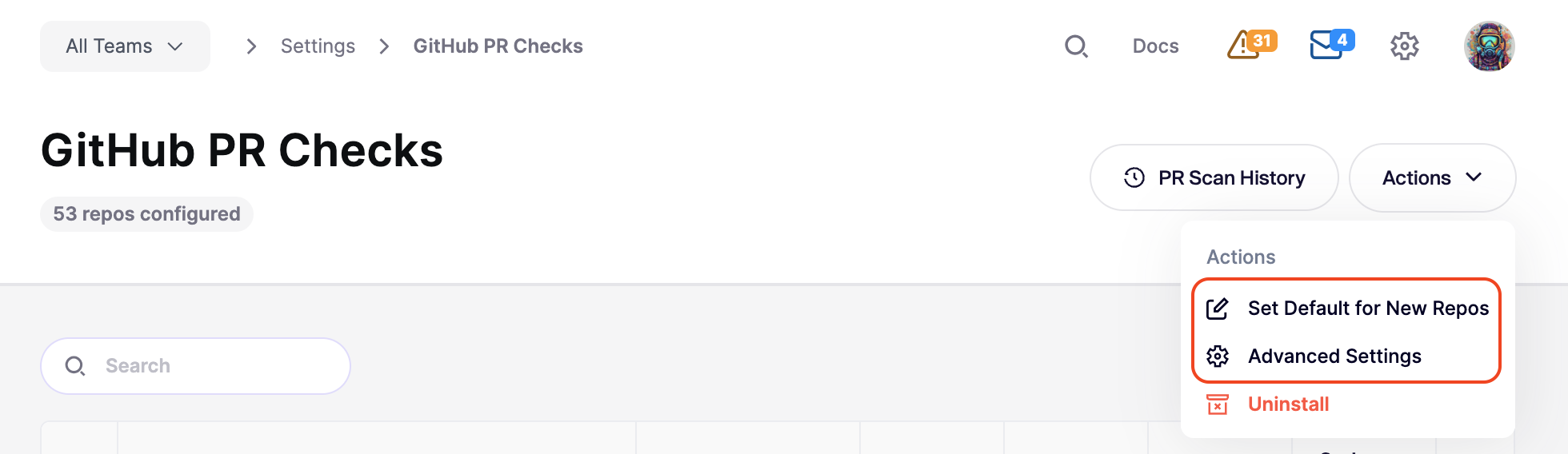
When you set up gating in Aikido, you have granular control over what triggers a failure. These settings are found by going to **Integrations > PR Quality Gating > \[Your Setup]**.
From here, you can:
* **Set Defaults:** Define the default gating configuration for all new repositories added to your workspace. See [Automatic Configuration for Newly Added Repos](/pr-and-release-gating/aikido-ci-gating-functionality/default-pr-mr-gating-configuration-for-new-repositories.md).
* **Bulk Edit:** Select multiple repositories to apply configuration changes across your entire project.
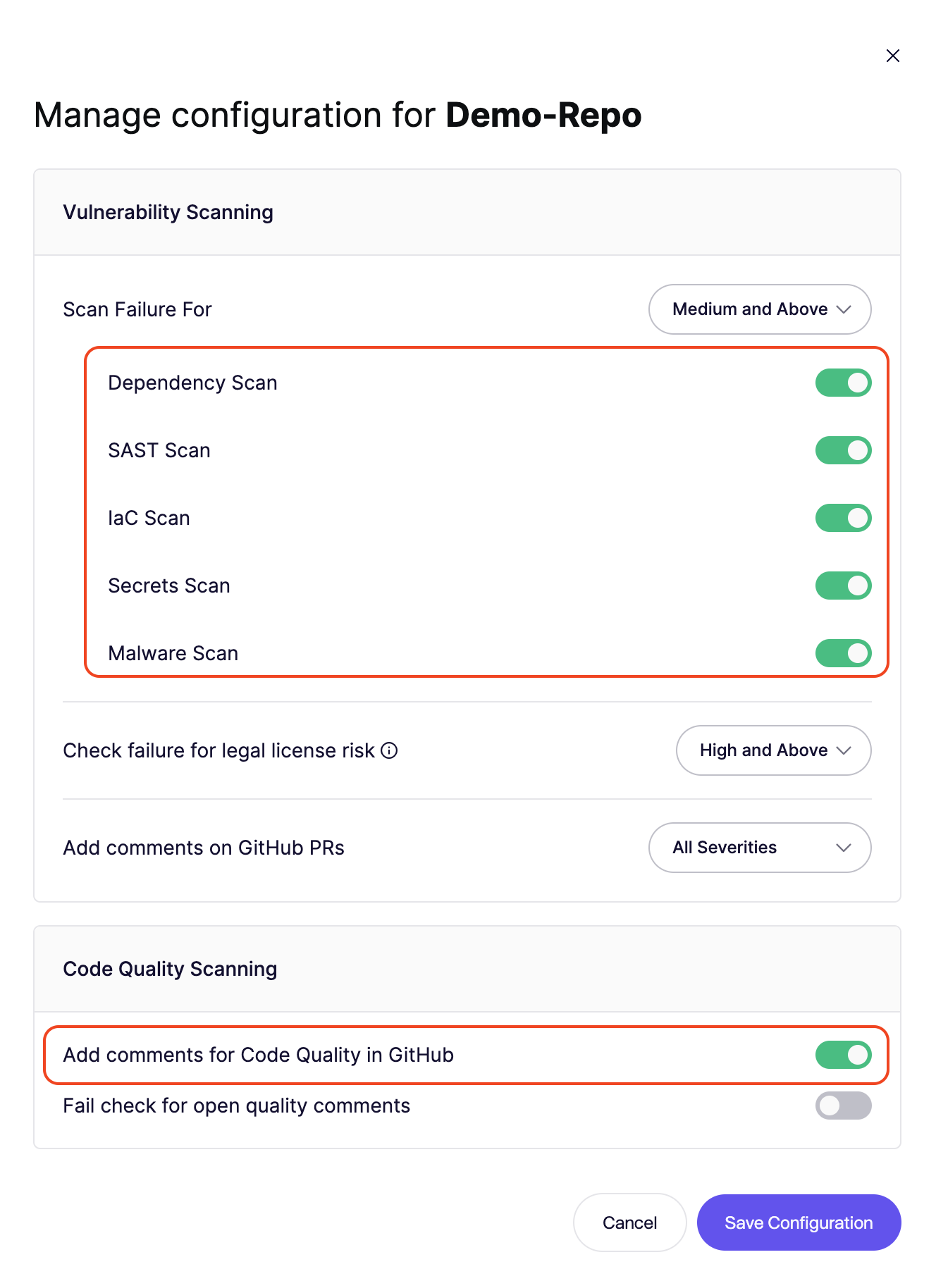
* **Granular Control:** Adjust settings for a single repository to handle specific project needs.
* **Advanced Settings:** Fine-tune how Aikido interacts with your workflow.
### Failure threshold
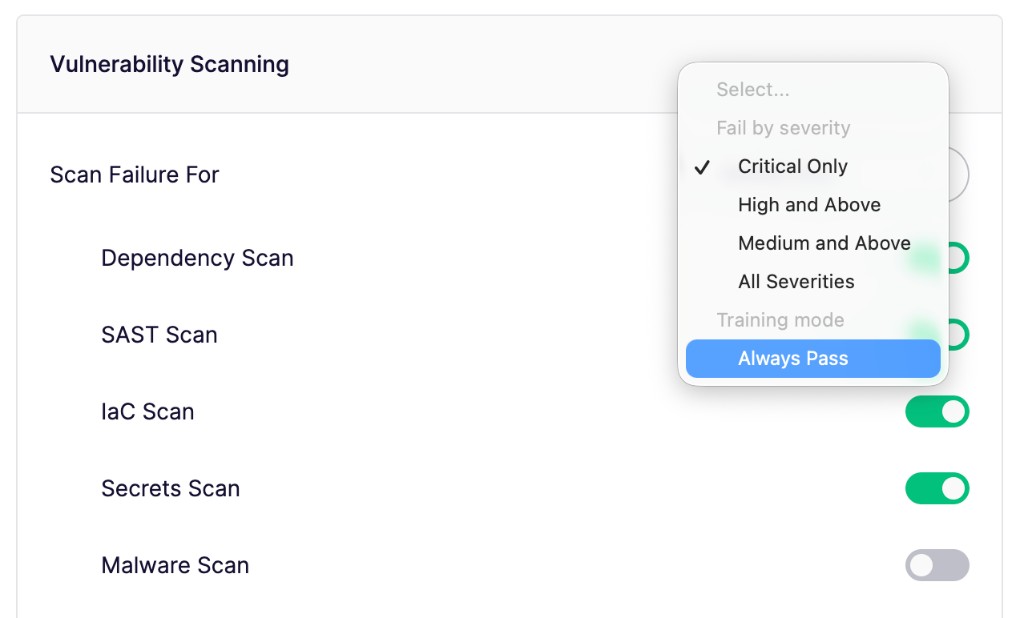
Select the minimum severity level that will cause the CI gate to fail (e.g., **Critical** or **High**).
* Any new issue detected at or above this level will fail the gate.
* Issues below this threshold will still be reported but won't block the merge.
* Choose **Always Pass** to run the enabled scans without failing the PR check.
* [Deep Review](/deep-review/configure-deep-review.md#pr-check-gating) uses this same threshold. It does not have a separate gating setting.
### Scans to Execute
Toggle specific scan types on or off for the CI gate. This allows you to focus on the security categories that are most relevant to your workflow.
### Advanced Configuration
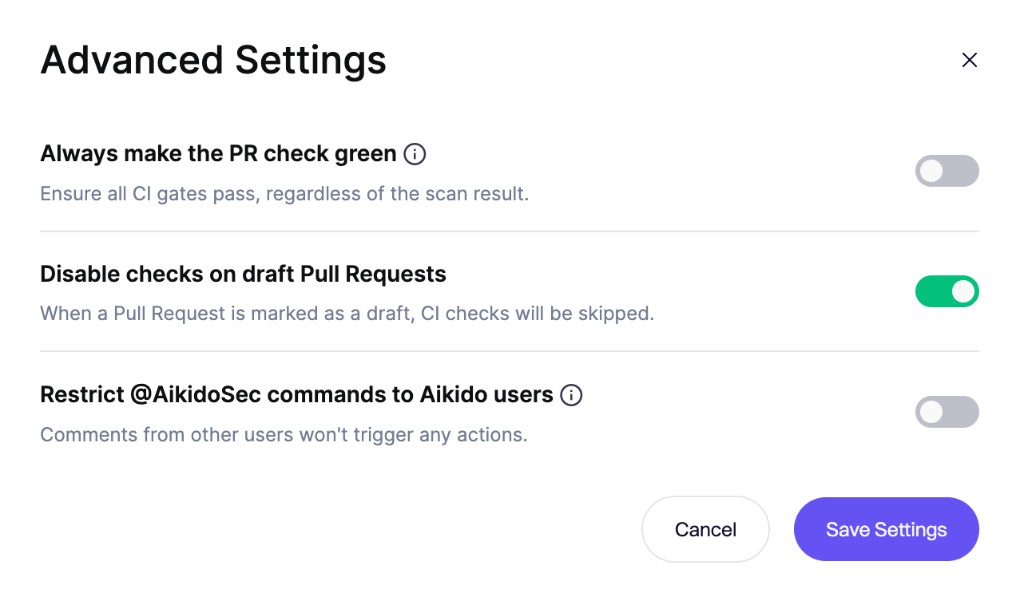
Fine-tune how Aikido interacts with your workflow to maintain developer velocity:
* **Always make the PR check green:** Keep PR checks green across your workspace while Aikido continues to report findings from all enabled scans. This applies to every configured gate and repository.
* **Disable checks on draft Pull Requests:** Avoid generating noise on work-in-progress code. Scans only trigger once the PR is moved to "Ready for Review."
* **Restrict `@AikidoSec` commands to Aikido users:** Only members of your Aikido workspace can trigger actions via PR or MR comments (like `@AikidoSec ignore`). Comments from other users are rejected with a reply.
{% hint style="info" %}
**Restrict `@AikidoSec` commands to Aikido users** is available for GitHub and GitLab. Support for Bitbucket and Azure DevOps is coming soon.
{% endhint %}
## **Checking results**
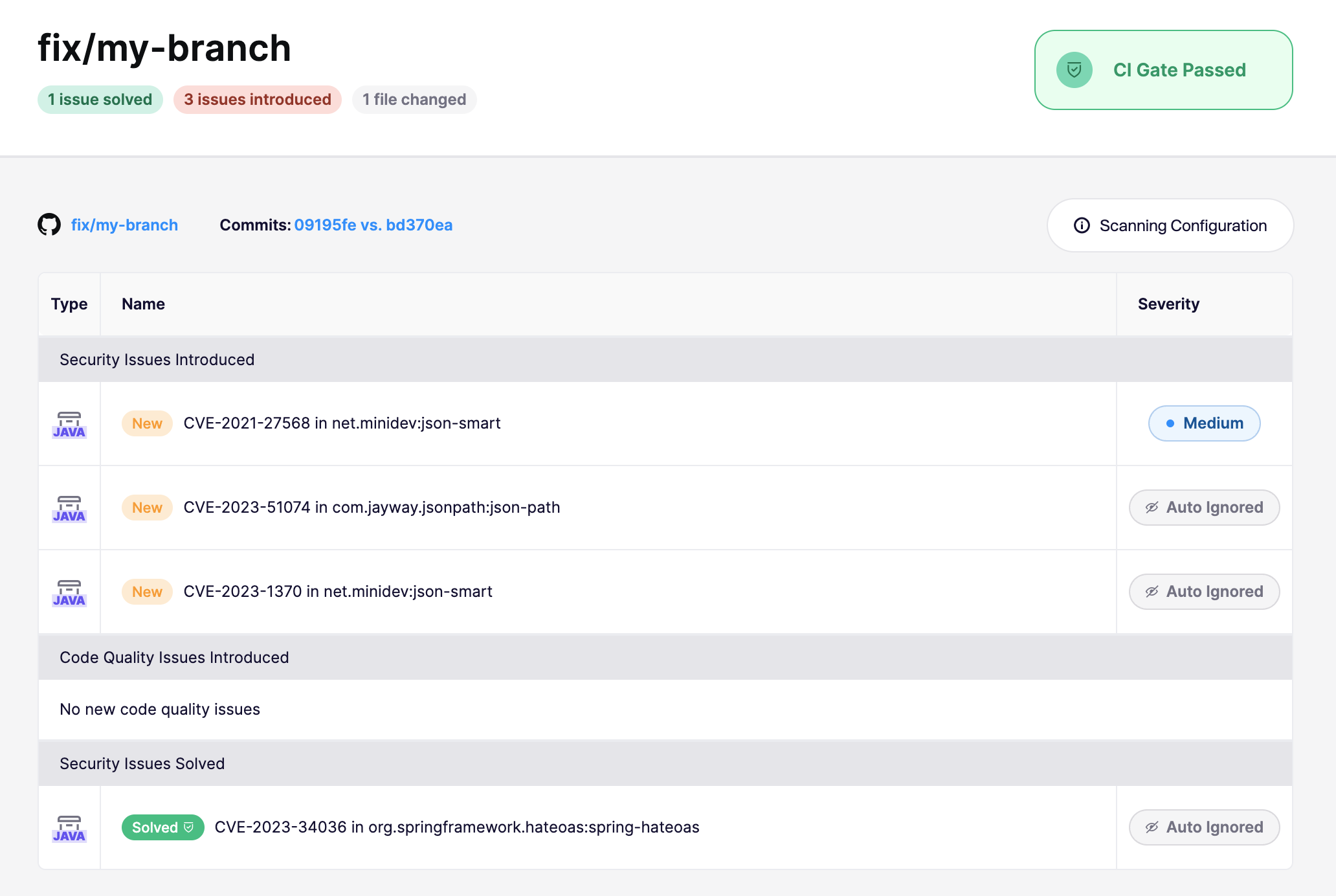
After a CI run, Aikido provides a direct link to the scan results for that specific branch. Because Aikido scans the branch diff rather than the entire repo, it clearly distinguishes between **fixed issues** and **newly introduced risks**.
* **Fixed in branch:** If a PR resolves an existing vulnerability, Aikido marks it as "PR open" in your feed, allowing you to verify the fix before merging.
* **New issues:** Anything introduced in the branch that exceeds your severity threshold will trigger a failure (unless **Always Pass** is enabled).
### Bypassing a failed state
In case you would like to bypass a failed state, this is possible by ignoring the issues that caused the CI gate to fail. You can do this by clicking the issue and in the top right **Actions menu** select Ignore or Snooze. This issue will then be ignored/snoozed in any future branches in your CI.
{% hint style="info" %}
Only users that have the permission to snooze or ignore issues can bypass the CI gate immediately. Users without ignore permissions can request an ignore from a PR or MR comment or the issue feed. Admins review those in the [Approval Inbox](/getting-started/core-functionalities/approval-inbox-for-ignored-issues.md).
{% endhint %}
---
# Agent Instructions
This documentation is published with GitBook. GitBook is the documentation platform designed so that both humans and AI agents can read, navigate, and reason over technical content effectively. Learn more at gitbook.com.
## Querying This Documentation
If you need additional information that is not directly available in this page, you can query the documentation dynamically by asking a question.
Perform an HTTP GET request on the current page URL with the `ask` query parameter, and the optional `goal` query parameter:
```
GET https://help.aikido.dev/pr-and-release-gating/aikido-ci-gating-functionality.md?ask=&goal=
```
`ask` is the immediate question: it should be specific, self-contained, and written in natural language.
`goal` is optional and describes the broader end goal you are ultimately trying to accomplish on behalf of the user. GitBook uses it to tailor the answer towards what is most useful for that goal.
The response will contain a direct answer to the question and relevant excerpts and sources from the documentation.
Use this mechanism when the answer is not explicitly present in the current page, you need clarification or additional context, or you want to retrieve related documentation sections.