
# Add Additional Headers in API Scanning

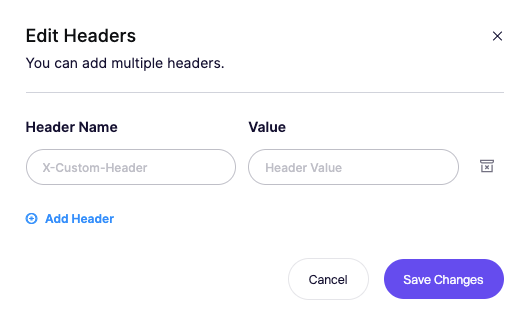
Add custom headers that Aikido will include in every request during an API scan. This is useful for auth tokens, tenant IDs or any header your service needs before it accepts traffic.

Aikido sends each header you define with all scan requests. The scanner does not try to detect missing headers on its own, so make sure you include everything your API requires. Unlike our [Authentication](/dast-surface-monitoring/api-scanning/authenticated-api-scanning-for-rest-graphql.md) these headers are included during the scan.
<figure><img src="/files/8tUl39f577v3GKnaYhUe" alt=""><figcaption></figcaption></figure>

### Typical use cases

* Static auth tokens for staging or test environments
* X API Key headers
* Version or tenant selectors
* Headers needed to bypass a gateway or WAF in front of your API

## Add a header

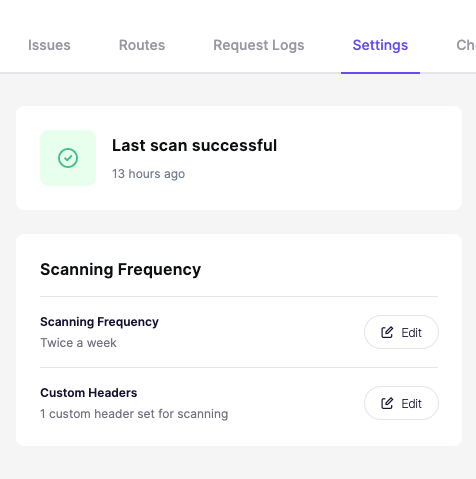
1. Click Edit headers in the API Settings page.
<figure><img src="/files/R4ddKZ36Fwju3VCjc3fk" alt=""><figcaption></figcaption></figure>

1. Enter the header name.
2. Enter its value.
3. Add more headers if needed.
4. Save changes.


---

# Agent Instructions: Querying This Documentation

If you need additional information that is not directly available in this page, you can query the documentation dynamically by asking a question.

Perform an HTTP GET request on the current page URL with the `ask` query parameter:

```
GET https://help.aikido.dev/dast-surface-monitoring/api-scanning/add-additional-headers-in-api-scanning.md?ask=<question>
```

The question should be specific, self-contained, and written in natural language.
The response will contain a direct answer to the question and relevant excerpts and sources from the documentation.

Use this mechanism when the answer is not explicitly present in the current page, you need clarification or additional context, or you want to retrieve related documentation sections.
