> For the complete documentation index, see [llms.txt](https://help.aikido.dev/llms.txt). Markdown versions of documentation pages are available by appending `.md` to page URLs; this page is available as [Markdown](https://help.aikido.dev/zen-firewall/zen-features/bypassed-ips.md).
# Bypassed IPs
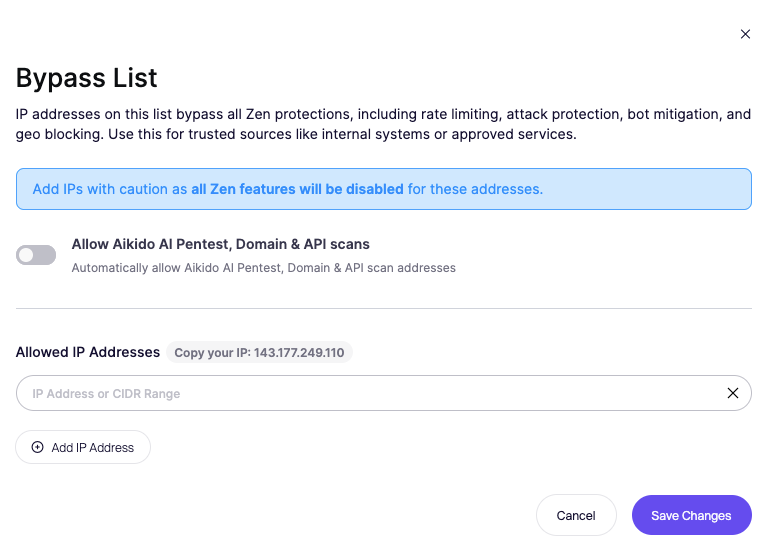
Bypassed IPs are trusted IP addresses or CIDR ranges that Aikido Zen explicitly ignores during request processing. Any request coming from a bypassed IP is fully excluded from Zen inspection and enforcement.
This means Zen will not analyze the request, generate findings, or apply blocking rules for that traffic.
## Why use bypassed IPs
Not all traffic represents real attacker behavior. Some requests come from systems you trust and control.
Common examples include internal infrastructure such as load balancers or reverse proxies, monitoring and uptime services, internal testing environments, approved security tools, or Aikido scanning traffic.
Bypassing these IPs helps reduce noise, avoids false positives, and keeps alerts focused on real threats.
When running **AI pentesting or Domain and API security** scans, bypassing IPs can be useful depending on the type of scan you want to perform.
In some cases, you may want Zen fully enabled to observe detections and blocking behavior. In other cases, temporarily bypassing scan traffic prevents interference and allows uninterrupted testing.
## How to configure bypassed IPs
{% hint style="danger" %}
All Zen security features will be disabled for the configured IPs, so only add sources you fully trust.
{% endhint %}
1. Go to the Firewall tab in the Aikido dashboard
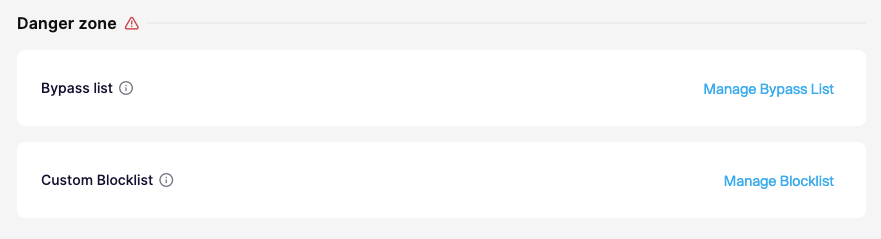
2. Scroll to the Danger zone section at the bottom of the page
3. Select Manage Bypass List
4. Add one or more IP addresses or CIDR ranges
5. Save your changes
---
# Agent Instructions
This documentation is published with GitBook. GitBook is the documentation platform designed so that both humans and AI agents can read, navigate, and reason over technical content effectively. Learn more at gitbook.com.
## Querying This Documentation
If you need additional information that is not directly available in this page, you can query the documentation dynamically by asking a question.
Perform an HTTP GET request on the current page URL with the `ask` query parameter, and the optional `goal` query parameter:
```
GET https://help.aikido.dev/zen-firewall/zen-features/bypassed-ips.md?ask=&goal=
```
`ask` is the immediate question: it should be specific, self-contained, and written in natural language.
`goal` is optional and describes the broader end goal you are ultimately trying to accomplish on behalf of the user. GitBook uses it to tailor the answer towards what is most useful for that goal.
The response will contain a direct answer to the question and relevant excerpts and sources from the documentation.
Use this mechanism when the answer is not explicitly present in the current page, you need clarification or additional context, or you want to retrieve related documentation sections.