> For the complete documentation index, see [llms.txt](https://help.aikido.dev/llms.txt). Markdown versions of documentation pages are available by appending `.md` to page URLs; this page is available as [Markdown](https://help.aikido.dev/code-scanning/scanning-practices/denoise-via-secret-keyword-filter.md).
# Denoise via Secret Keyword Filter
The Secret Keyword Filter reduces noise in secrets scanning. It lets workspace admins skip lines that contain known safe keywords before gitleaks evaluates them.
{% hint style="warning" %}
This filter skips the **entire line** from secrets scanning. Use it carefully. A broad keyword can hide real secrets on matching lines.
{% endhint %}
### Use Cases
Use the Secret Keyword Filter when:
* The same false positive appears across many files or repositories
* The trigger is a stable string, such as a config key or variable name
* You want a workspace-wide setting instead of per-line comments
Do **not** use it as a general allowlist replacement. It complements gitleaks allowlists. It does not replace them.
### How to add Secret Keyword Filter
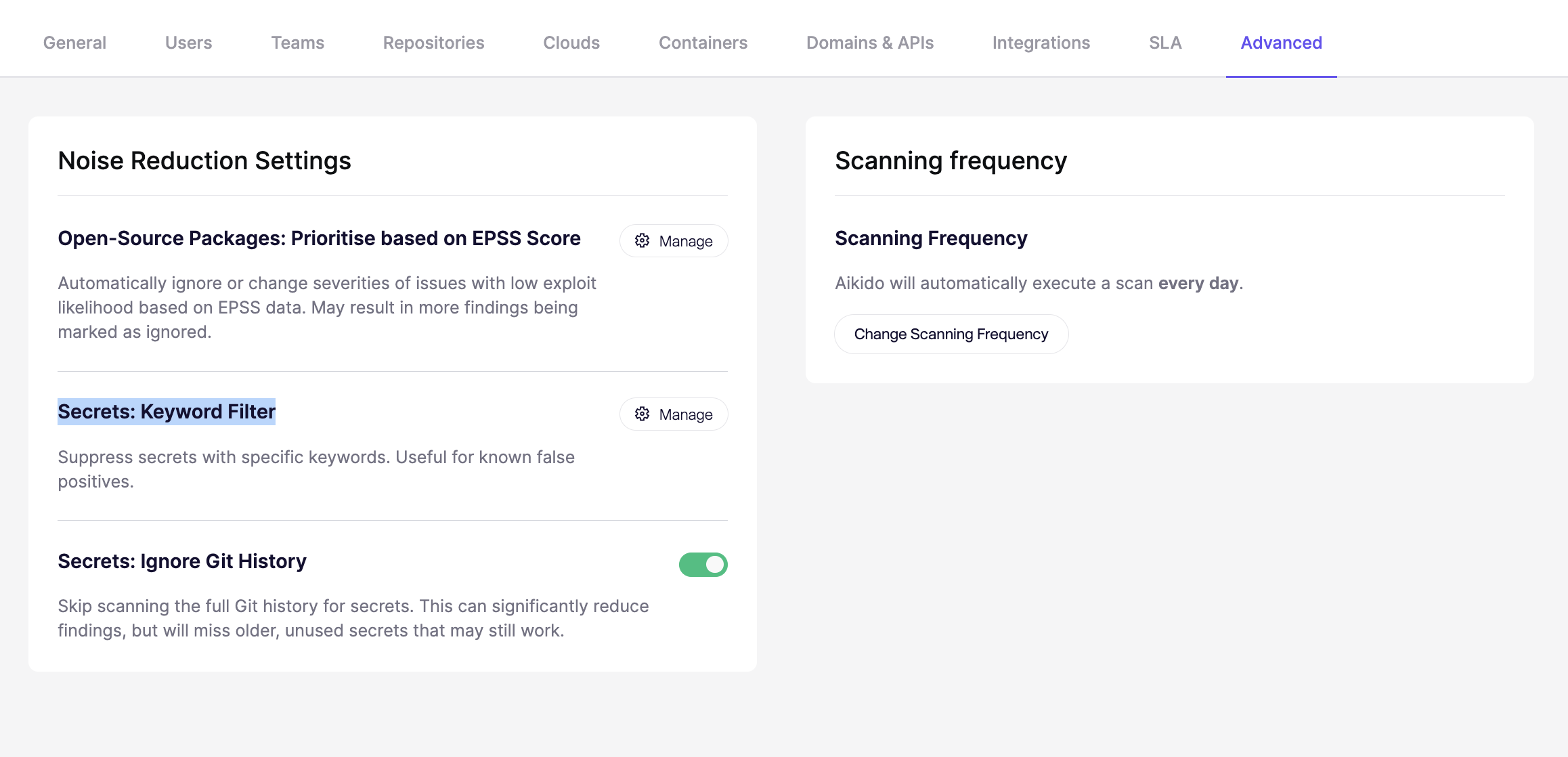
**Step 1.** Go to **Settings** → **Advanced** → **Secret Keyword filter** and click Manage
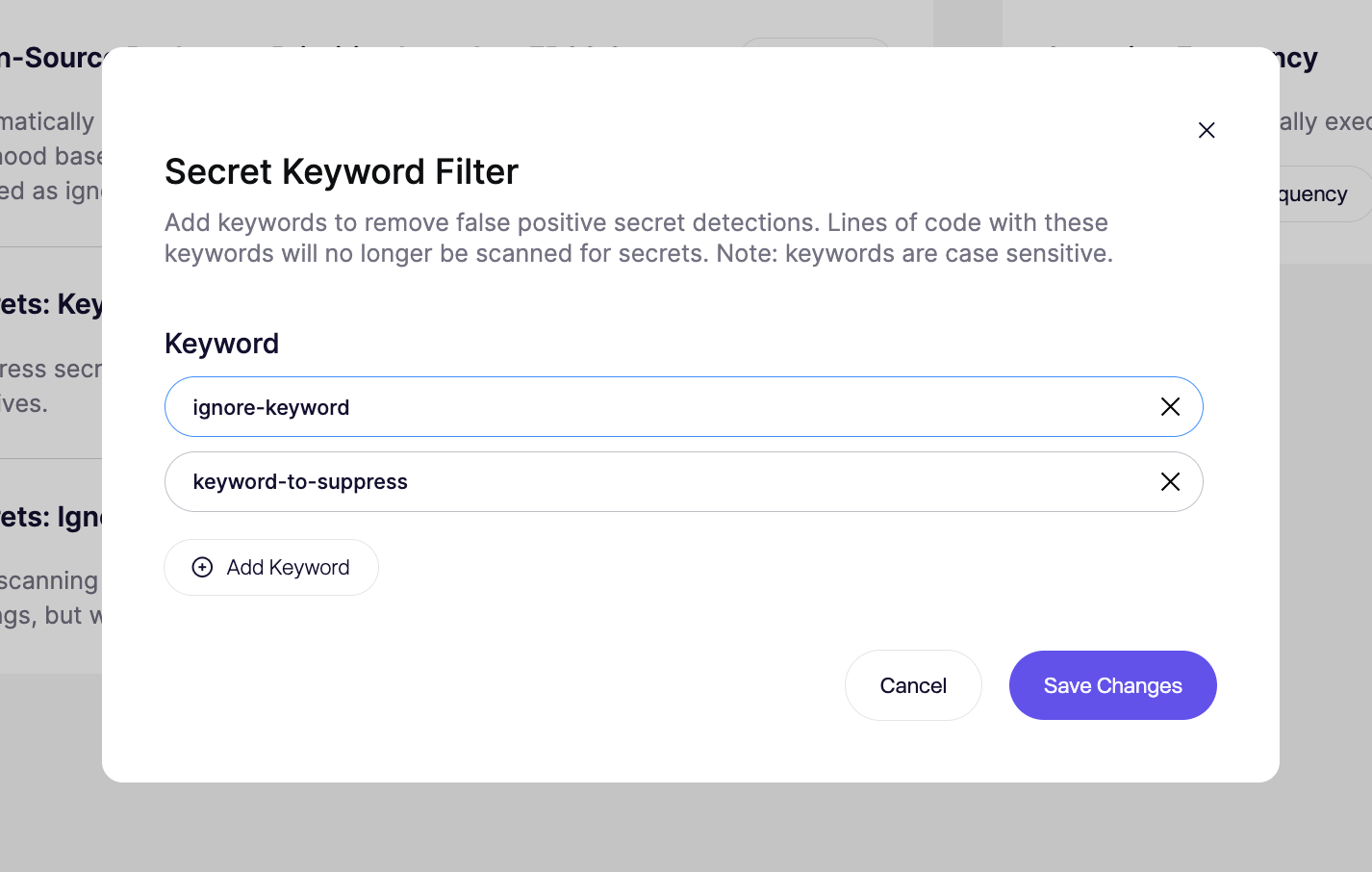
**Step 2. Add a keyword** in the input fields. Multiple can be added.
**Step 3. Hit save and run a scan for the changes to apply**
### Important notes
* **Minimum 5 characters:** shorter keywords are rejected
* **Case-sensitive:** `MySecret` and `mysecret` are different keywords
* **Next scan only:** saved changes apply to future scans only
### How matching works
This filter uses **plain string matching**. It is **not** a regex filter.
If a configured keyword appears anywhere on a line, that full line is excluded from secrets detection.
Example:
```javascript
const EXAMPLE_TOKEN = process.env.EXAMPLE_TOKEN;
const apiKey = "sk_live_123456";
```
If `EXAMPLE_TOKEN` is in the keyword list, the first line is skipped. The second line is still scanned.
If the first line contained a real secret as well, that secret would also be skipped. The filter works at line level, not token level.
### Best practices
* Use specific keywords, not generic terms
* Prefer stable identifiers like config keys or variable names
* Add multiple casing variants when needed
* Review matches carefully before saving
* Re-scan after changes to confirm noise dropped without hiding real issues
Good candidates:
* `EXAMPLE_SENDGRID_KEY`
* `dummyStripeSecret`
* `integration_test_token`
Poor candidates:
* `token`
* `secret`
* `auth`
### Alternative Suppression Methods
Use the Secret Keyword Filter for **repeated, workspace-wide false positives**.
Use [code comments](/code-scanning/scanning-practices/ignoring-secrets-via-code-comments.md) when you want to suppress a **single known-safe line** in code.
Use [.aikido file exclusions](/code-scanning/scanning-practices/ignore-via-code-with-aikido-files.md) when you want to exclude **specific files or paths** from scanning.
---
# Agent Instructions
This documentation is published with GitBook. GitBook is the documentation platform designed so that both humans and AI agents can read, navigate, and reason over technical content effectively. Learn more at gitbook.com.
## Querying This Documentation
If you need additional information that is not directly available in this page, you can query the documentation dynamically by asking a question.
Perform an HTTP GET request on the current page URL with the `ask` query parameter, and the optional `goal` query parameter:
```
GET https://help.aikido.dev/code-scanning/scanning-practices/denoise-via-secret-keyword-filter.md?ask=&goal=
```
`ask` is the immediate question: it should be specific, self-contained, and written in natural language.
`goal` is optional and describes the broader end goal you are ultimately trying to accomplish on behalf of the user. GitBook uses it to tailor the answer towards what is most useful for that goal.
The response will contain a direct answer to the question and relevant excerpts and sources from the documentation.
Use this mechanism when the answer is not explicitly present in the current page, you need clarification or additional context, or you want to retrieve related documentation sections.