
Deep Reviewを設定する
PR Checks から 1 つ以上のリポジトリで Deep Review を有効にします。有効化後は、各リポジトリの設定で厳格さレベルを選択し、 関連するリポジトリをリンク。同じカードには次が表示されます Deep Review のメモリ.
Deep Review はセキュリティレビューと同じゲーティング設定を使用します。個別の失敗しきい値はありません。
Deep Reviewの料金は プルリクエスト1件につき1クレジット. 同じPRに対する追加レビューは追加料金なしです。
Deep Review を有効にする
PR Checks を開く
次へ移動します: リポジトリ > プル/マージリクエスト > PR/MR Checks を管理。また、 PR/MR チェックを管理 を直接開くこともできます。
リポジトリを選択する
1 つ以上のリポジトリを選択します。一括で有効にするには、設定したいすべてのリポジトリを選択してから、クリックします 「PR スキャンを設定」 一括操作バーで。
Deep Review をオンにする
を開き、 詳細レビュー セクションを開いてオンにし PR を Deep Review する.
変更を保存します
クリックします 「保存」。Aikido は選択したリポジトリの今後のプルリクエストをレビューします。
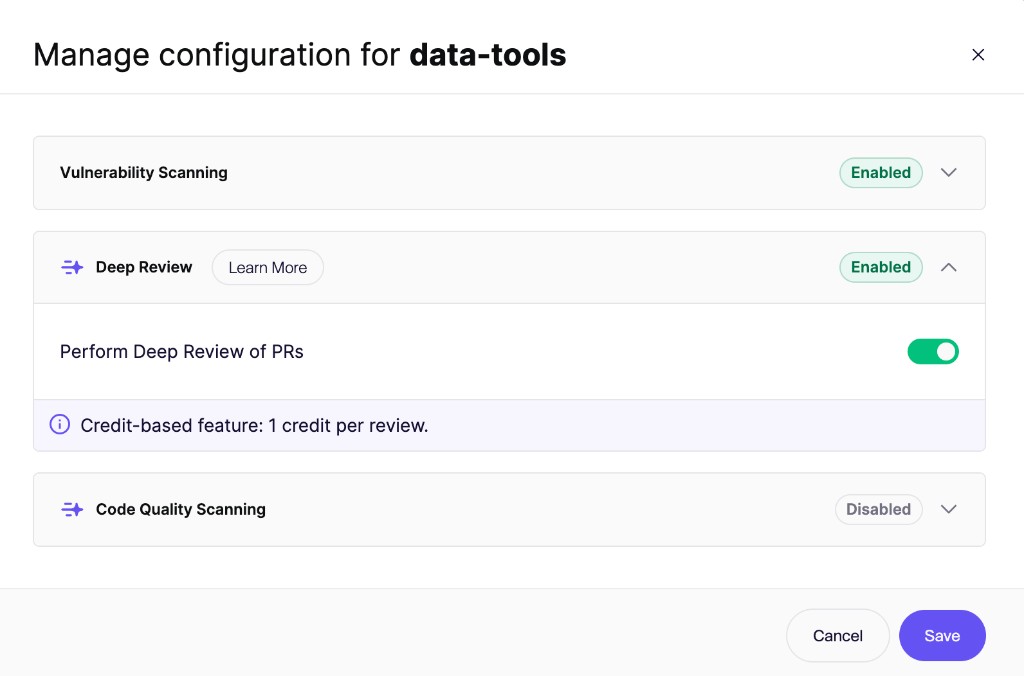
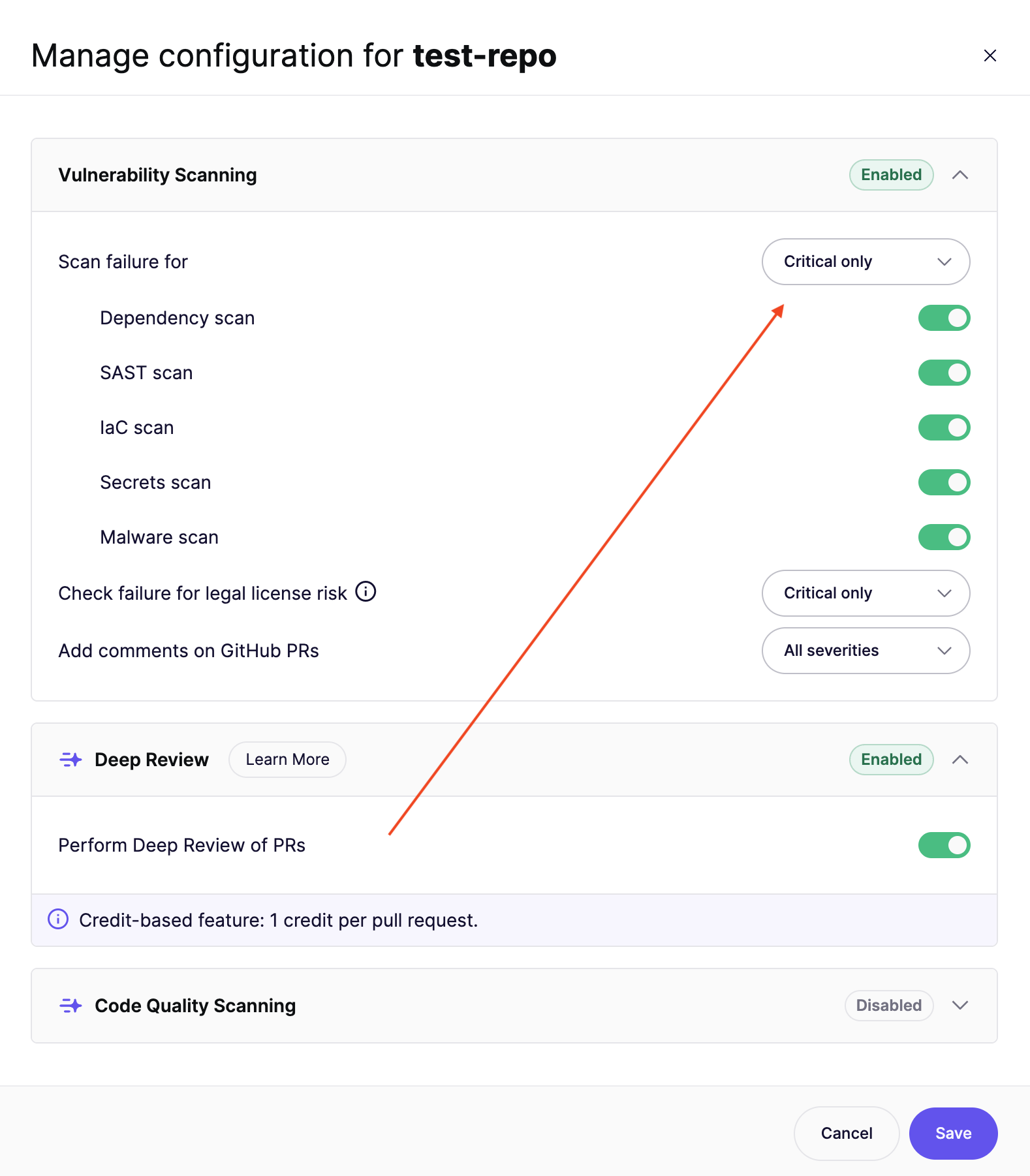
PR チェックのゲーティング
Deep Review は、そのリポジトリのセキュリティレビューのゲーティング設定に従います。これらの設定は、 脆弱性スキャン 同じ PR Checks モーダルのセクションで変更します。
次の スキャン失敗の しきい値は、次の項目にも適用されます Aikido Security: Deep Review チェック:
- しきい値以上の検出結果は、Deep Review チェックに失敗します。
- しきい値未満の検出結果も引き続き報告されコメントされますが、チェックは失敗しません。
- 常に合格 Deep Review チェックは緑のまま維持されます。Aikido は引き続き PR をレビューし、コメントを投稿します。
もし PRチェックを常に成功にする ワークスペースで有効になっている場合、Deep Review チェックも緑のまま維持されます。
参照 PRゲーティング概要 失敗しきい値の設定方法について。
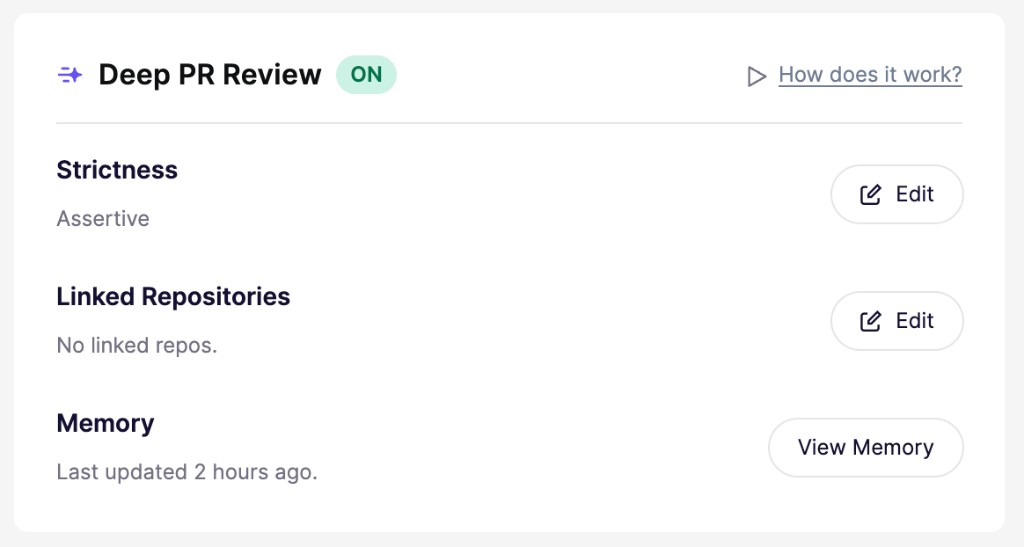
リポジトリの Deep Review 設定を開く
各リポジトリについて、厳格さ、リンクされたリポジトリ、メモリが表示されます:
- 次を開きます: リポジトリ そして、設定したいリポジトリを選択します。
- その リポジトリ設定.
- 次の項目を見つけます: Deep PR Review カード
- クリックします 編集 の横にある 厳格さ または リンクされたリポジトリ。応答から Aikido が学習した内容を確認するには、クリックしてください メモリを表示。 Deep Review メモリ.
厳格さレベルを選択する
厳格さによって、Deep Review が投稿するフィードバックの量が決まります:
- ゆるめ:レビューを要点に絞り、コメントを少なく保ちます。
- 標準:レビュー担当者を圧倒せず、バランスよくカバーします。
- 積極的:より多くの潜在的な問題や改善点を指摘するため、コメントが増えます。
パスとファイルを除外する
Aikido は、依存関係フォルダ、ビルド出力、生成ファイル、ロックファイル、バイナリ、メディアを含む多くのパスを標準で無視しています。さらに多くのパスを除外するには、 .aikido ファイル。プルリクエストが除外されたファイルのみを変更する場合、Aikido はレビューをスキップし、料金は発生しません。
参照 Deep Reviewの仕組み 詳細について。
クレジット
Deep Reviewの料金は プルリクエスト1件につき1クレジット.
同じ PR に対する追加のレビュー(たとえば新しいコミット後)でも、追加のクレジットは消費されません。クレジットはコミットごとや個別のレビュー実行ごとではなく、PR ごとに課金されます。詳細はこちら: Aikidoクレジット.
チームで Deep Review にどれくらいの費用がかかるか気になりますか?
当社の 見積もりツール が、過去30日間の利用状況に基づいて目安を示します。
月間支出上限を設定する
ワークスペース管理者は、Deep Review の支出上限を Wallet設定.
ウォレット設定を開く
次へ移動します: Wallet設定。また、 組織設定 に移動し、 ウォレットを管理.
Deep Review の上限を設定する
クリックします 上限を設定。オンにする 詳細レビュー トグルを使って、 クレジット/月 の上限を入力し、クリックします Save.
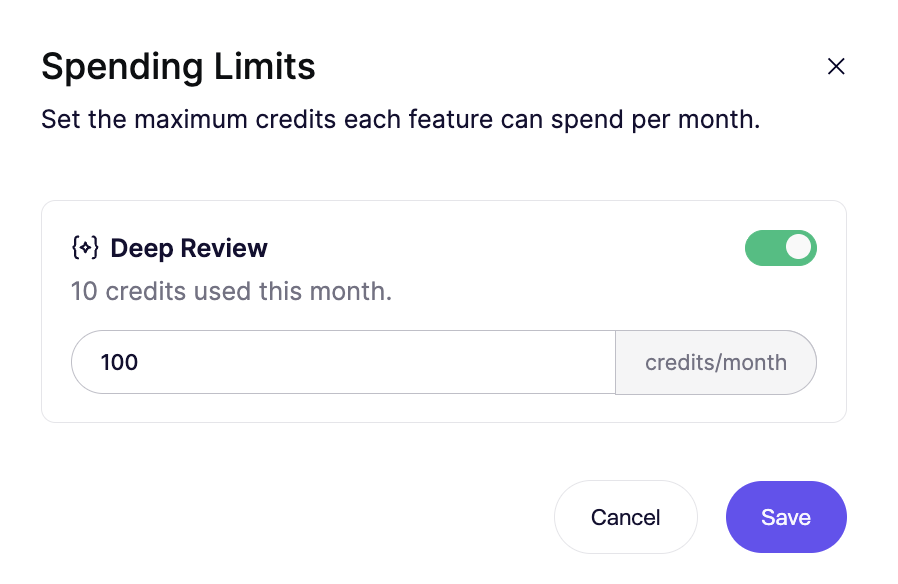
使用量が上限に達すると、Aikido は次の暦月まで、クレジットが消費される Deep Review をスキップします。同じ PR に対する追加のレビューは引き続き実行されます。
月間上限を設定したくない場合は、トグルをオフにしてください。