> For the complete documentation index, see [llms.txt](https://help.aikido.dev/llms.txt). Markdown versions of documentation pages are available by appending `.md` to page URLs; this page is available as [Markdown](https://help.aikido.dev/docs/docs-ja/zen-firewall/zen-installation-instructions/zen-firewall-for-php/laravel-forge.md).

# Laravel Forge 上の PHP

このガイドでは、Aikido の Zen Firewall をアプリケーションにインストールしてセットアップする手順を説明します。以下の手順に従って、アプリケーションを保護してください。

問題や不具合が発生した場合は、サポートチャットまたは GitHub Issues でお気軽にご連絡ください

<https://github.com/AikidoSec/firewall-php>

## 要件

* PHP 7.2以上（PHP 8.5までテスト済み）。
* Laravel Forge の管理サーバー実行環境。
* [Aikido アカウント](/docs/docs-ja/hajimeni/setting-up-your-account.md) & [Zen Firewall トークン](/docs/docs-ja/zen-firewall/zen-installation-instructions/creating-an-aikido-zen-firewall-token.md)

## インストールと設定

{% stepper %}
{% step %}
**Aikido による Zen Firewall をインストール**

Forge で、サーバー環境に環境変数を追加します:

```env
AIKIDO_TOKEN=AIK_RUNTIME_...
AIKIDO_BLOCK=false
```

Forge サーバーでインストールコマンドを実行します:

```bash
curl -L -O https://github.com/AikidoSec/firewall-php/releases/latest/download/aikido-php-firewall.x86_64.deb && sudo dpkg -i -E ./aikido-php-firewall.x86_64.deb
```

インストール後、PHP-FPM を再起動します。
{% endstep %}

{% step %}
**リクエストのブロックとユーザー識別を有効にする**

このミドルウェアを使用して、レート制限、ユーザー識別、およびブロック機能を有効にします。

Zen Firewall は攻撃をブロックするためにこのミドルウェアを必要としません。基本的な攻撃保護はこれがなくても機能します。このミドルウェアは、Zen が次のような保護に使用する追加のリクエストコンテキストを提供します [レート制限](/docs/docs-ja/zen-firewall/zen-features/setting-up-rate-limiting-for-routes.md), [ユーザーブロック](/docs/docs-ja/zen-firewall/zen-features/blocking-users-with-zen-firewall.md), [ボットブロック](/docs/docs-ja/zen-firewall/zen-features/blocking-bot-traffic-with-zen-firewall.md), [国別ブロック](/docs/docs-ja/zen-firewall/zen-features/blocking-traffic-by-country-with-zen-firewall.md)、そして [脅威アクター](/docs/docs-ja/zen-firewall/zen-features/blocking-known-threat-actors-with-zen-firewall.md) ブロック。

アプリケーションでユーザーを識別し、リクエストを処理する方法に合わせて、例を調整してください。

使用 `set_user` および `should_block_request` をリクエストパイプライン内で使用します：

{% @aikido-custom-code/code-highlight language="php" content="+if (extension\_loaded('aikido')) {

* \aikido\set\_user('123', 'John Doe');
*
* $decision = \aikido\should\_block\_request();
*
* if ($decision->block && $decision->type === 'blocked') {
* ```
    http_response_code(403);
  ```
* ```
    exit('You are blocked by Zen.');
  ```
* }
*
* if ($decision->block && $decision->type === 'ratelimited') {
* ```
    http_response_code(429);
  ```
* ```
    exit('You are rate limited by Zen.');
  ```
* }
  +}" %}
  {% endstep %}

{% step %}
**アプリをテスト**

アプリケーションにアクセスし、いくつかの操作を行うか、いくつかのページを開いてください。Zen はアプリケーション内のルートを自動的に検出します。

{% hint style="info" %}
Zen は10分ごとに Aikido にデータを送信します
{% endhint %}

次の Zen アプリケーションのページを確認して、エージェントが正常に動作していることを確認できます:

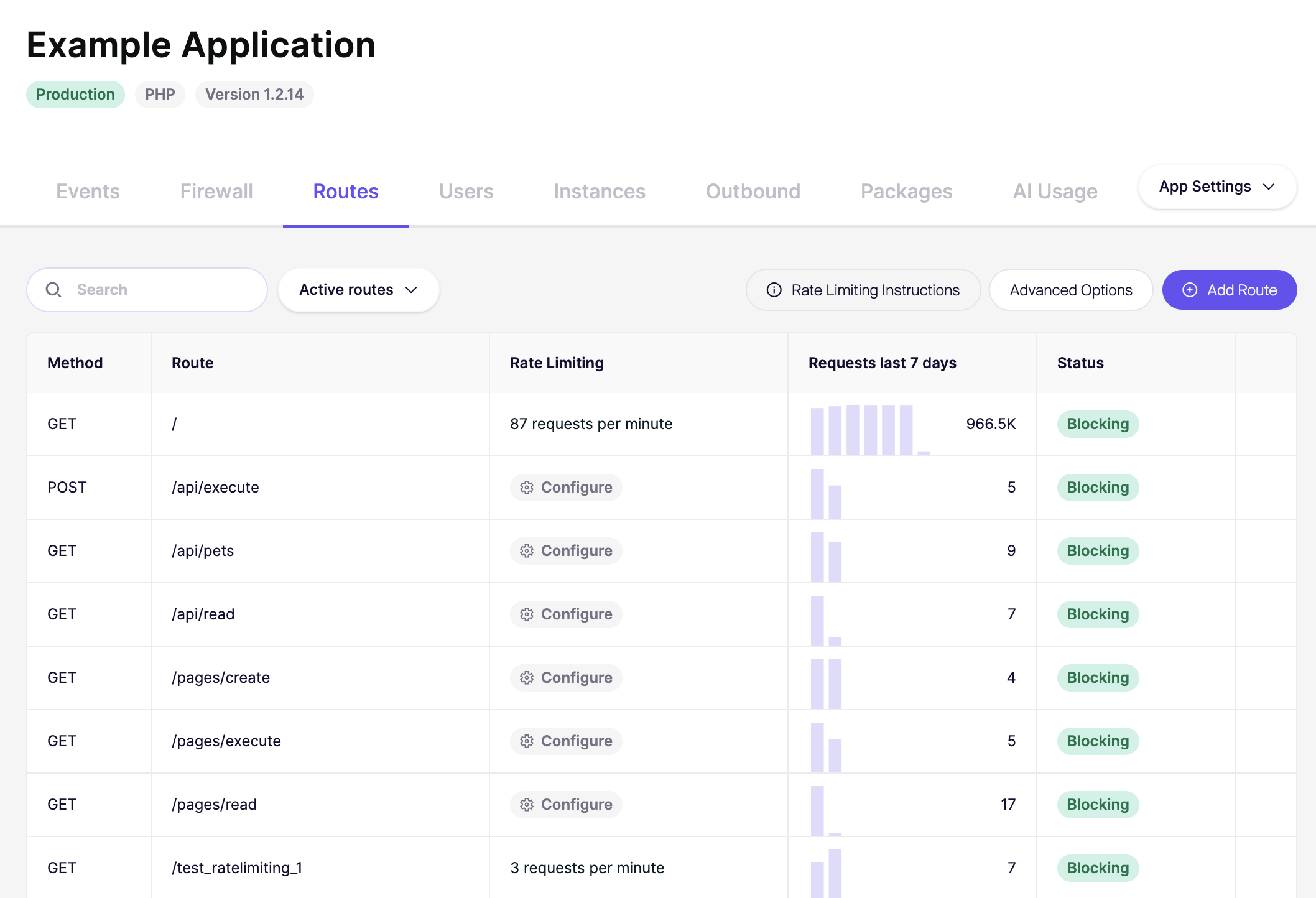
* **イベント**： 「Application started」イベントが表示されるはずです。
* **ルート**： しばらくすると、アプリケーションのルートがここに表示され始め、メソッド、ルート、リクエストが表示されます。
* **インスタンス**： Zen がインストールされているアプリケーションのアクティブなインスタンス数が表示されるはずです。

<figure><img src="/files/bb6b16755cff4893513acdf0b399ab02ac7f5629" alt=""><figcaption></figcaption></figure>
{% endstep %}

{% step %}
**ダッシュボードでレート制限を設定**

Zen Firewall ミドルウェアを追加したら、Aikido ダッシュボードでレート制限を設定することで、ブルートフォース攻撃からルートを保護するテストができます。

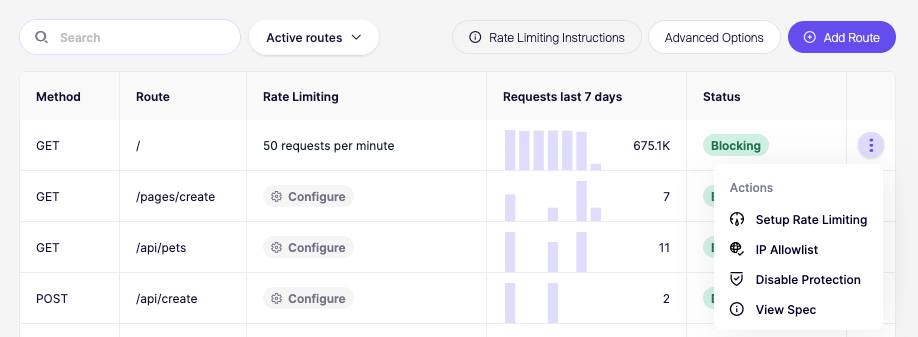
1. 作成したアプリをクリックします。
2. 次へ移動 **ルート** タブ。
3. 制限したいルートを見つけてクリック **レート制限を設定**.
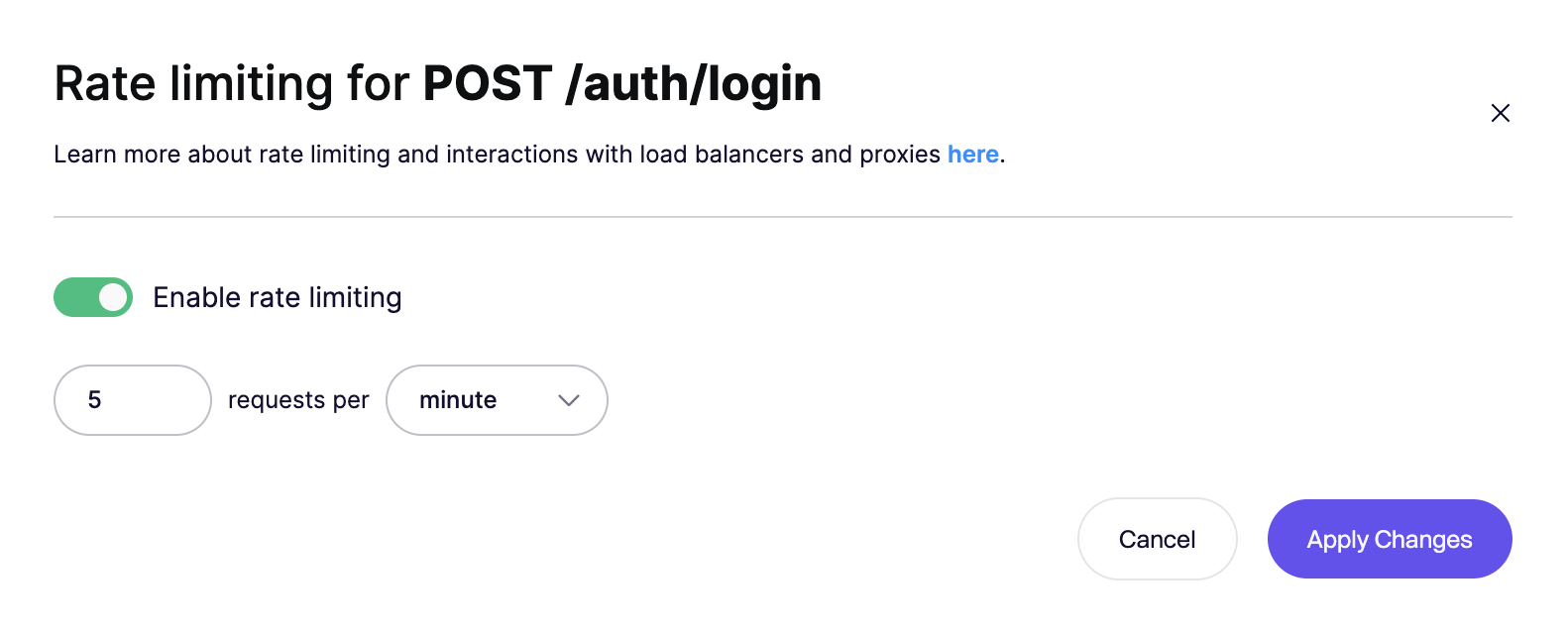
4. 手順に従ってレート制限を設定します（例：1分あたり5リクエスト）。

![保護とレート制限のオプションを備えた認証ルートを表示する API ルート管理インターフェース。](/files/e261faad47cc6b8291385535f551e58938a77367)

![POST /auth/login のレート制限を1分あたり5リクエストに設定します。](/files/532f8ebb75a40ac740e8c3d35685a3aeb1b7e97d)

**レート制限を確認**

アプリを起動し、レート制限を設定したルートに1分以内に5回アクセスしてみてください。5回目の試行後、レート制限エラーが表示されるはずです：

```
Aikido Firewall によってレート制限されています。（あなたのIP: 1.2.3.4）
```

{% endstep %}

{% step %}
**次のステップ**

おめでとうございます。Zen Firewall のインストールに成功しました。問題が発生した場合や、懸念事項・機能要望がある場合は、遠慮なくサポートまでご連絡ください。

これで、Zen Firewall が提供する多くの機能を見て回ることができます。

* [Zen Firewall でボットトラフィックをブロック](/docs/docs-ja/zen-firewall/zen-features/blocking-bot-traffic-with-zen-firewall.md)
* [Zen Firewall で Tor トラフィックをブロックまたは監視](/docs/docs-ja/zen-firewall/zen-features/blocking-tor-traffic-with-zen-firewall.md)
* [Zen Firewall でユーザーを追跡](/docs/docs-ja/zen-firewall/zen-features/blocking-users-with-zen-firewall.md)
* [Zen Firewall で既知の脅威アクターをブロック](/docs/docs-ja/zen-firewall/zen-features/blocking-known-threat-actors-with-zen-firewall.md)
* [Zen Firewall で国別にトラフィックをブロック](/docs/docs-ja/zen-firewall/zen-features/blocking-traffic-by-country-with-zen-firewall.md)
* [ルートのレート制限を設定](/docs/docs-ja/zen-firewall/zen-features/setting-up-rate-limiting-for-routes.md)
* [送信先ドメインを監視](/docs/docs-ja/zen-firewall/zen-features/monitor-outbound-domains.md)

追加情報：

* [Zen のパフォーマンスと信頼性](/docs/docs-ja/zen-firewall/miscellaneous/how-zen-works-performance-reliability.md)
* [Zen Firewall のブロックモードと検出モード](/docs/docs-ja/zen-firewall/zen-features/blocking-vs-detection-mode-in-zen-firewall.md)
* [Zen の統計を理解する](/docs/docs-ja/zen-firewall/zen-features/understanding-your-zen-statistics.md)
  {% endstep %}
  {% endstepper %}


---

# Agent Instructions
This documentation is published with GitBook. GitBook is the documentation platform designed so that both humans and AI agents can read, navigate, and reason over technical content effectively. Learn more at gitbook.com.

## Querying This Documentation
If you need additional information that is not directly available in this page, you can query the documentation dynamically by asking a question.

Perform an HTTP GET request on the current page URL with the `ask` query parameter, and the optional `goal` query parameter:

```
GET https://help.aikido.dev/docs/docs-ja/zen-firewall/zen-installation-instructions/zen-firewall-for-php/laravel-forge.md?ask=<question>&goal=<endgoal>
```

`ask` is the immediate question: it should be specific, self-contained, and written in natural language.
`goal` is optional and describes the broader end goal you are ultimately trying to accomplish on behalf of the user. GitBook uses it to tailor the answer towards what is most useful for that goal.

The response will contain a direct answer to the question and relevant excerpts and sources from the documentation.

Use this mechanism when the answer is not explicitly present in the current page, you need clarification or additional context, or you want to retrieve related documentation sections.