
デバイスの接続と管理
デバイスとは、インストールされたエージェントを通じてデバイス保護に接続された任意のコンピュータのことです。接続されると、Aikido はそのデバイスにインストールされているパッケージを自動的に検出し、監視します。
デバイスを接続する
- 次へ移動します: Device Protection を開き、右上の Devices タブを選択します。
- クリックします Connect Device を開きます。
- セットアップ手順に従って、デバイスにエージェントをインストールしてください。
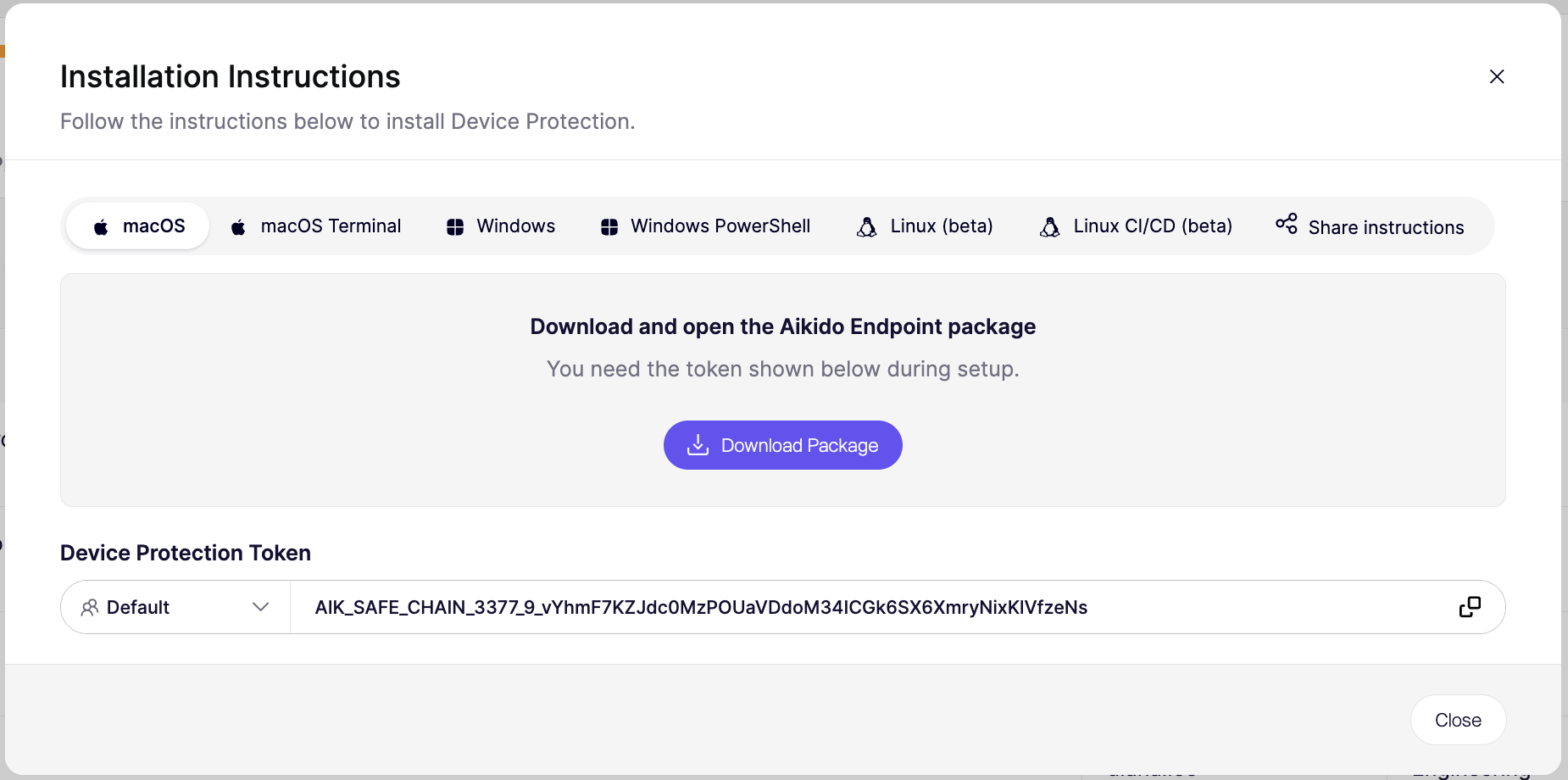
エージェントがインストールされると、 デバイスはデバイス一覧に表示されます ステータスは「アクティブ」になります。
デバイス一覧
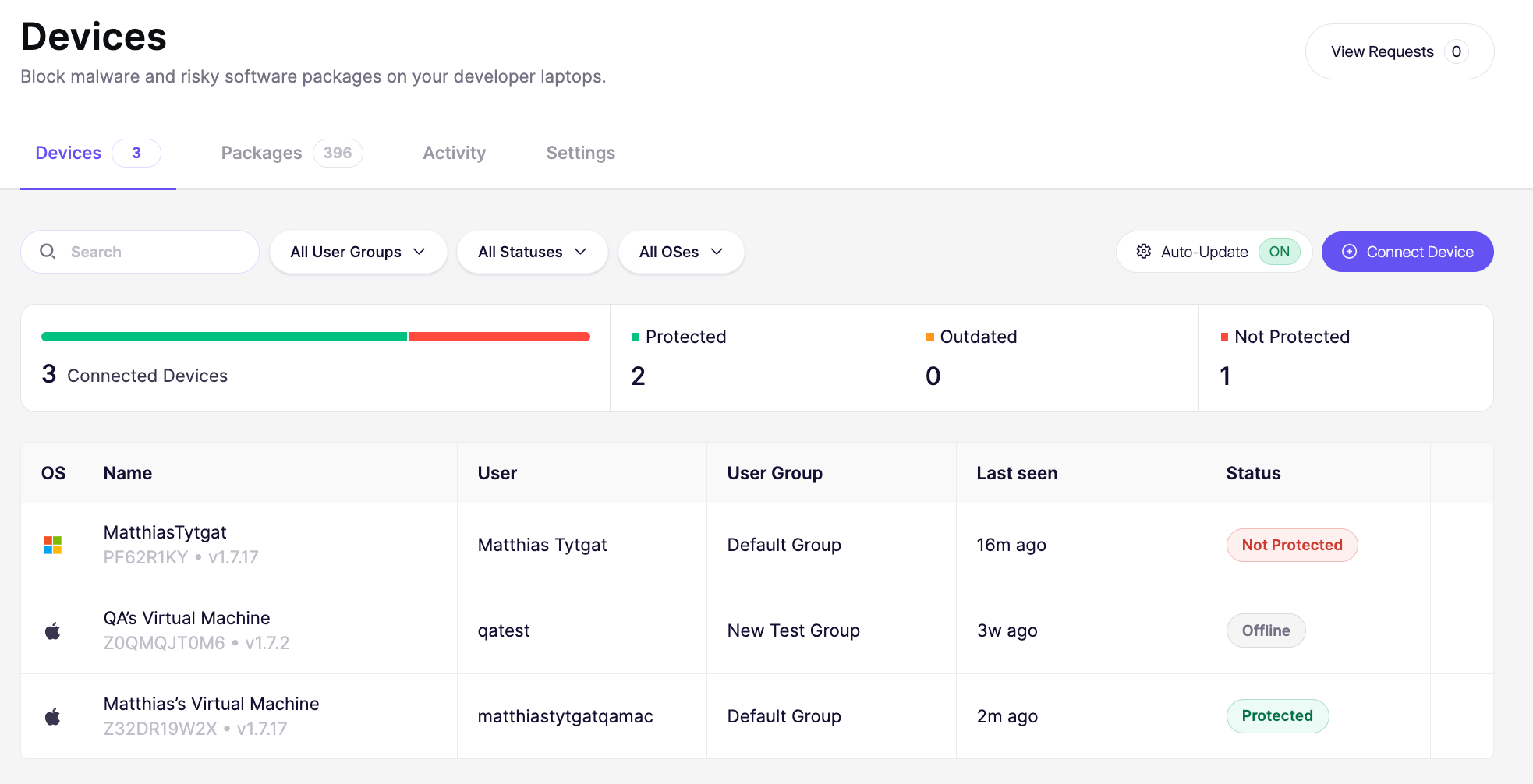
デバイス一覧には、接続されているすべてのデバイスが表示されます。各行には次が表示されます:
- OS: オペレーティングシステムの種類
- Name: デバイス名と所有者(例:「Kate Davis の Windows PC」)
- User: デバイス上のアカウント名
- User Group: デバイスが所属するグループ(例: マーケティング、プロダクト、セールス)
- Last seen: デバイスが最後にチェックインした時刻
- Agent Status: エージェントが現在アクティブかオフラインか、およびデバイス保護が最新かどうか
デバイスのステータス
Aikido は、エージェントの最後のハートビートからどれだけ時間が経過したかに基づいてデバイスのステータスを設定します。エージェントは10分ごとにハートビートを送信します。
| ステータス | ルール |
|---|---|
| アーカイブ済み | 30日以上ハートビートがありません。 |
| オフライン | 60分を超えてハートビートがありません。 |
| 未保護 / 更新 / 保護済み | 過去60分以内のハートビート。どちらが表示されるかは、セットアップが完了しているかどうかと、エージェントのバージョンが最新かどうかによって異なります。新しいエージェントバージョンが利用可能な場合、デバイスには「更新」と表示されます(参照 自動更新). |
自動更新
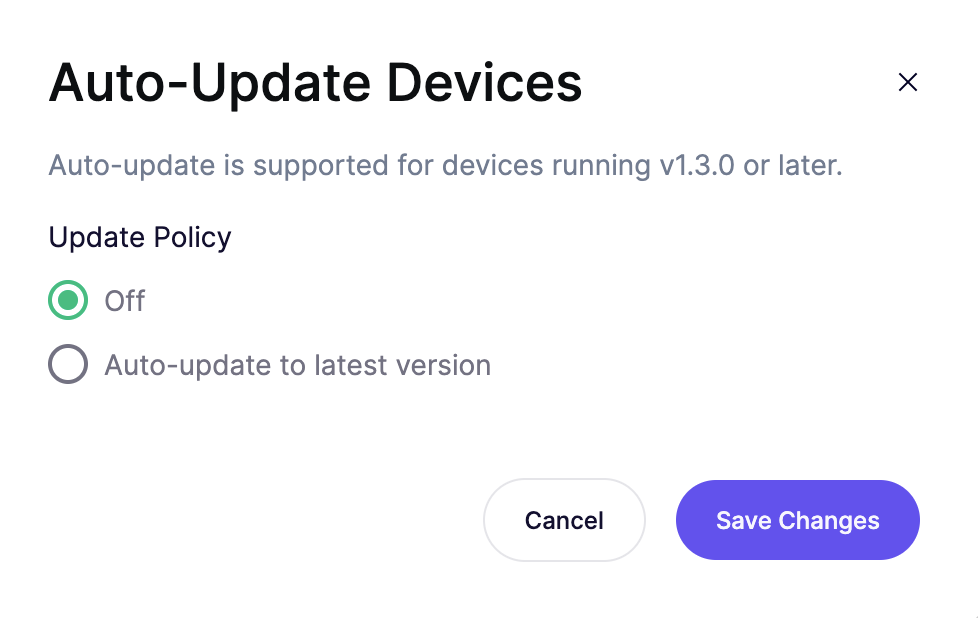
自動更新により、再デプロイせずにデバイス上のエージェントを最新の状態に保てます。このポリシーはワークスペース内のすべてのデバイスに適用され、エージェント 1.3.0 以降を実行しているデバイスで動作します。新しいワークスペースは 最新バージョンに自動更新.
- オフ: デバイスはインストール済みのバージョンのままです。自分で更新するまで、「更新」ステータスが表示されます。
- 最新バージョンに自動更新: 各新しいエージェントリリースにデバイスが更新されます。
自動更新を有効にしておくと、デバイスはバグ修正や新機能をリリースされ次第すぐに受け取れます。Aikido はエンドツーエンドテストを実施し、各バージョンをまず社内向けに公開してから、段階的に展開し、必要に応じて自動的にロールバックします。
ポリシーを変更するには:
- へ移動 Devices ページ上で使用します。
- クリックします 自動更新.
- 次の項目の下で 更新ポリシー、ポリシーを選択します。
- クリックします 変更を保存.
ユーザーグループ
Device Protection 用のユーザーグループデバイス操作
次の項目をクリックします: ⋮ デバイスの横にあるメニューでデバイス操作を表示します。
デバイスの保護を一時停止する
[保護を一時停止]は、エージェントをアンインストールせずに、特定のデバイスでデバイス保護を一時的にオフにします。デバイスは接続されたままで、作業が終わったら同じメニューから保護を再度オンにできます。
通常の手順ではなく、例外として使用してください。定期的に行う必要があることについては、 インストールポリシー または ユーザーグループに の代わりに。
保護を一時停止する理由:
- デバイス保護自体が原因である可能性のある問題のトラブルシューティング
- 長期的なルールを設定する間に、ポリシーでブロックされているソフトウェアを緊急でインストールする
- IT またはサポートが、保護を一時的にオフにする必要がある修正手順をユーザーに案内する
- デバイス保護が、デバイス上の他のセキュリティツールや監視ツールと競合しているかどうかを確認する
一時停止中は、デバイスは不正または悪意のあるパッケージのインストールから保護されません。作業が終わったらすぐに保護を再度オンにしてください。
デバイスを削除する
[デバイスを削除]は、デバイスをデバイス保護から切断し、デバイス一覧から削除します。これはデバイス自体からエージェントをアンインストールするものではありません。
次のような場合にデバイスを削除します:
- 廃棄、消去、または交換された場合
- 従業員が退職し、デバイスを監視する必要がなくなった場合
- 誤って、またはテスト目的で接続され、追跡する必要がない場合
デバイスを削除しても、Aikido から削除されるだけです。デバイス保護の実行を完全に停止するには、 エージェントをアンインストールしてください デバイスから。