> For the complete documentation index, see [llms.txt](https://help.aikido.dev/llms.txt). Markdown versions of documentation pages are available by appending `.md` to page URLs; this page is available as [Markdown](https://help.aikido.dev/aikido-device-protection/deploying-aikido-endpoint/connecting-and-managing-devices.md).
# Connecting and Managing Devices
A device is any computer connected to Device Protection through an installed agent. Once connected, Aikido automatically detects and monitors the packages installed on that device.
## Connecting a device
1. Go to [Device Protection and open the Devices](https://app.aikido.dev/endpoint-protection/devices) tab.
2. Click **Connect Device** in the top right.
3. Follow the setup instructions to install the agent on the device.
Once the agent is installed, the [device will appear in your device list](https://app.aikido.dev/endpoint-protection/devices) with an Active status.
## Device list
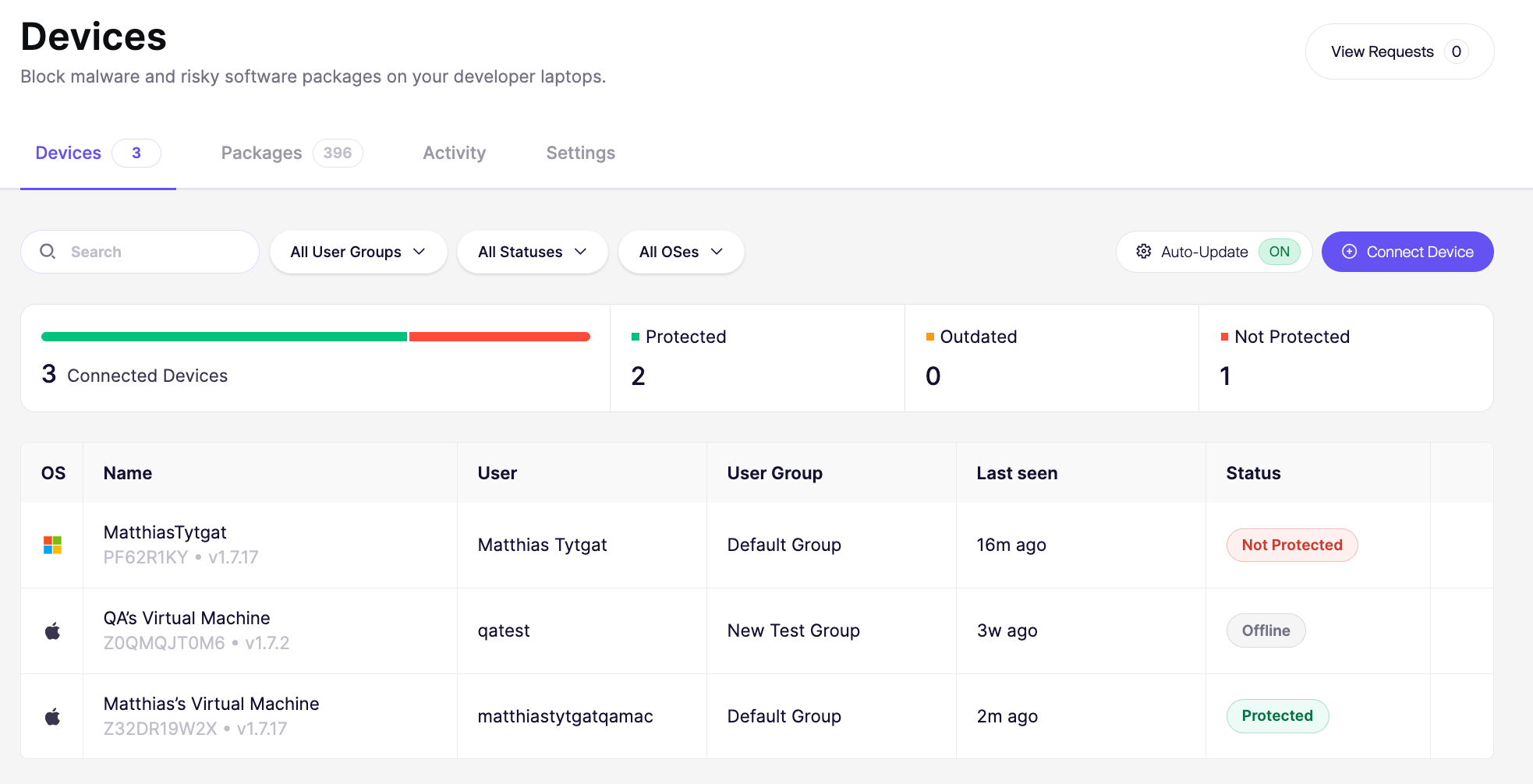
The device list shows every connected device. Each row shows:
* OS: Type of operating system
* Name: The device name and owner (e.g. "Kate Davis' Windows PC")
* User: The name of the account on the device
* User Group: Which group the device belongs to (e.g. Marketing, Product, Sales)
* Last seen: How recently the device checked in
* Agent Status: Whether the agent is currently active or offline and if Device Protection is up to date
{% hint style="info" %}
Agents are shown as active if they've been online in the last 72 hours
{% endhint %}
## User groups
{% content-ref url="/pages/l6Jr0yFrUmsVezoR1yoV" %}
[User Groups for Device Protection](/aikido-device-protection/deploying-aikido-endpoint/user-groups-for-aikido-endpoint.md)
{% endcontent-ref %}
## Device actions
Click the `⋮` menu next to a device to view device actions.
### Pausing protection on a device
Pause Protection temporarily turns off Device Protection on a specific device, without uninstalling the agent. The device stays connected, and you turn protection back on from the same menu when you're done.
Use it as an exception, not a routine step. For anything that needs to happen regularly, adjust your [installation policies](/aikido-device-protection/using-aikido-endpoint/configuring-installation-policies.md) or [user groups](/aikido-device-protection/deploying-aikido-endpoint/user-groups-for-aikido-endpoint.md) instead.
Reasons to pause protection:
* Troubleshooting an issue that might be caused by Device Protection itself
* Urgently installing software that's blocked by a policy, while you set up a longer-term rule
* IT or support walking a user through a fix that requires protection to be off temporarily
* Checking whether Device Protection is conflicting with another security or monitoring tool on the device
{% hint style="warning" %}
While paused, the device isn't protected against unauthorized or malicious package installs. Turn protection back on as soon as you're done.
{% endhint %}
### Removing a device
Remove Device disconnects the device from Device Protection and takes it off your device list. This does not uninstall the agent from the device itself.
Remove a device when:
* It's been decommissioned, wiped, or replaced
* An employee has offboarded and the device no longer needs to be monitored
* It was connected by mistake or for testing and doesn't need to be tracked
{% hint style="warning" %}
Removing a device only removes it from Aikido. To fully stop Device Protection from running, [uninstall the agent](/aikido-device-protection/deploying-aikido-endpoint/uninstall-aikido-endpoint.md) from the device.
{% endhint %}
---
# Agent Instructions
This documentation is published with GitBook. GitBook is the documentation platform designed so that both humans and AI agents can read, navigate, and reason over technical content effectively. Learn more at gitbook.com.
## Querying This Documentation
If you need additional information that is not directly available in this page, you can query the documentation dynamically by asking a question.
Perform an HTTP GET request on the current page URL with the `ask` query parameter, and the optional `goal` query parameter:
```
GET https://help.aikido.dev/aikido-device-protection/deploying-aikido-endpoint/connecting-and-managing-devices.md?ask=&goal=
```
`ask` is the immediate question: it should be specific, self-contained, and written in natural language.
`goal` is optional and describes the broader end goal you are ultimately trying to accomplish on behalf of the user. GitBook uses it to tailor the answer towards what is most useful for that goal.
The response will contain a direct answer to the question and relevant excerpts and sources from the documentation.
Use this mechanism when the answer is not explicitly present in the current page, you need clarification or additional context, or you want to retrieve related documentation sections.