
# Limit Image Scanning to Images with Specific Tags

By default, Aikido will always scan **the last image that was uploaded** in your docker repository.

In some cases it might be interesting to make sure only an image tagged with a specific tag (such as 'production-') is scanned.

Aikido allows you to set a tag filter per image. Go to [container settings ](https://app.aikido.dev/settings/container-image-registry)and click the triple dots action menu to enable this
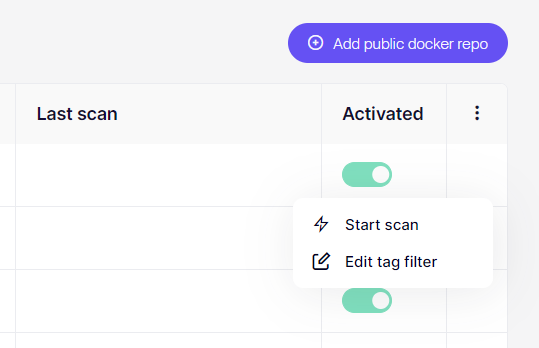
![Docker repo management interface with options to add, scan, or edit tag filters.](/files/ewdcv00phaE2RZhnv5hK)

It's possible to scan only images that start with specific words such as 'production-12345678'. To do this, enter the tag production-\* using \* as a wildcard.

***


---

# Agent Instructions: Querying This Documentation

If you need additional information that is not directly available in this page, you can query the documentation dynamically by asking a question.

Perform an HTTP GET request on the current page URL with the `ask` query parameter:

```
GET https://help.aikido.dev/container-image-scanning/configuration/limit-image-scanning-to-images-with-specific-tags.md?ask=<question>
```

The question should be specific, self-contained, and written in natural language.
The response will contain a direct answer to the question and relevant excerpts and sources from the documentation.

Use this mechanism when the answer is not explicitly present in the current page, you need clarification or additional context, or you want to retrieve related documentation sections.
