
Approving Install Requests
When "Force Requests for New Packages" is enabled for an ecosystem, team members cannot install new packages directly. Instead, their install attempts are sent to the Inbox for admin approval.
Accessing the Inbox
Click View Requests in the top right of the Device Protection page.
Approving a request
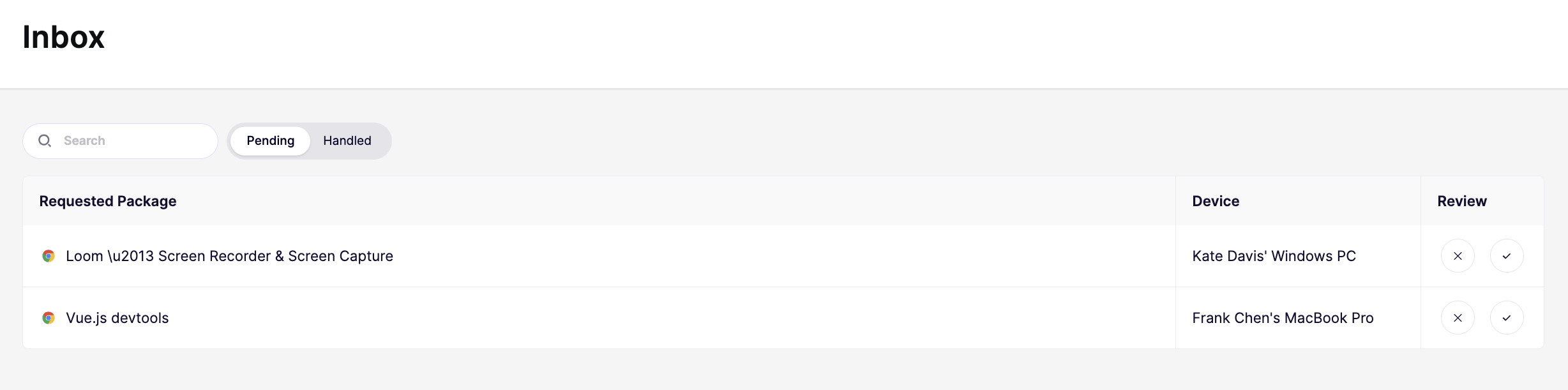
Each request shows the package name, and the device it was requested from. You have two options:
- Click the checkmark to approve the request. The package will be allowed to install on that device.
- Click the X to reject it. The install remains blocked.
It can take up to 10 minutes for changes to sync to all devices
Slack and Microsoft Teams Notifications
You can receive notifications when new install requests arrive in the Inbox. Aikido supports alerts via:
- Slack: Connect your Slack workspace to receive a message in a channel of your choice whenever a new request is pending.
- Microsoft Teams: Connect Microsoft Teams to receive notifications in a Teams channel.
To configure notifications, go to the Inbox page and click Manage Alerts.
Pending and Handled
The Inbox has two tabs:
- Pending shows requests that are still waiting for a decision. These need your attention.
- Handled shows requests you have already approved or rejected. Use this to check past decisions.
You can use the Search bar to find specific requests by package name.
What happens after a decision
An approved request counts as an explicit allow going forward. If the same package is requested again on another device, it will be allowed automatically (see rule 3 in Configuring Installation Policies).
A rejected request does not permanently block the package. If the same user or device requests it again, a new request will appear in the Inbox.