
GCP Artifact Registry
#Introduction
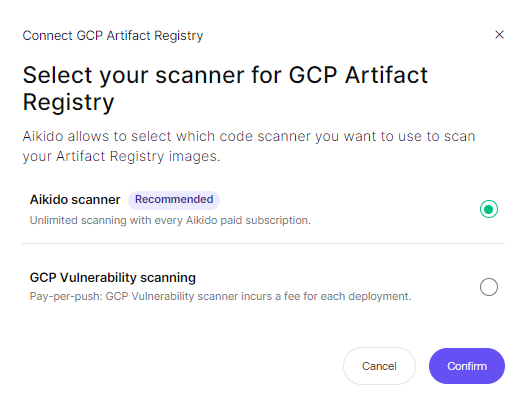
Aikido supports scanning GCP Artifact images through both the GCP scanner and the Aikido Scanner. Opting for the Aikido Scanner provides several benefits:
- Extended Scanning Capabilities: Scans for licenses and end-of-life (EOL) runtimes for comprehensive security insights.
- Quicker Results: Delivers scan results promptly to accelerate development and deployment processes.
- Targeted Scanning Efficiency: Allows scanning based on specific tags, enhancing relevance and efficiency.
- Continuous Scanning: Unlike GCP, which scans once at the moment of push, Aikido performs daily scans, even if your image hasn't been updated in a while. This means Aikido can identify new Common Vulnerabilities and Exposures (CVEs) in the meantime, which GCP might miss.
- Inclusive Pricing: Included in every paid plan, offering unlimited scans without the additional costs associated with GCP's pay-per-push model.
#Installing the Aikido Scanner
-
Navigate to Containers Page
-
Connect Registry: Click on 'Connect registry' and select the first option: 'GCP artifact registry'.
-
Select Aikido Scanner.
-
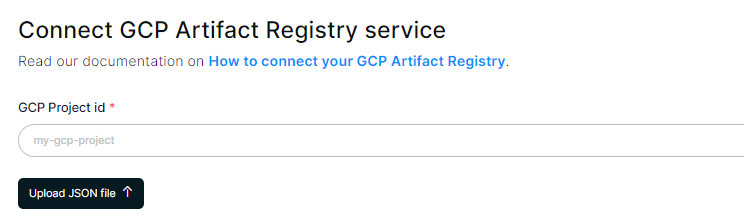
Fill in the Details: Create a service account called "AikidoContainerReader" and give it the role of "Artifact Registry Reader" at the project level.
Once the service account is created, you'll need to generate an access key and upload it to Aikido. This key will be used by Aikido to make the necessary API requests to scan your resources.
-
Completion: Once the setup is complete, Aikido will scan the connected registry with the Aikido scanner on a nightly basis.