> For the complete documentation index, see [llms.txt](https://help.aikido.dev/llms.txt). Markdown versions of documentation pages are available by appending `.md` to page URLs; this page is available as [Markdown](https://help.aikido.dev/code-scanning/miscellaneous/support-for-specific-branch-scanning.md).

# Support for Specific Branch Scanning

### Introduction <a href="#introduction" id="introduction"></a>

Utilize Aikido's manual scanning feature to directly compare a branch with your current project state/main branch, ideal for situations where you have not integrated your CI with Aikido yet.

This functionality allows you compare a specific branch / pull request / tag with the current state in Aikido, highlighting the changes with the main branch. Scanning takes typically **1-2mins** so no need to leave the UI.

**Note.** In case you have old legacy branches that needs daily scanning (eg branch V3, branch V4), check out our [Multi-Branch Scanning Feature](https://help.aikido.dev/en/articles/8979512-how-to-set-up-multi-branch-scanning).

### How to scan a specific branch <a href="#how-to-scan-a-specific-branch" id="how-to-scan-a-specific-branch"></a>

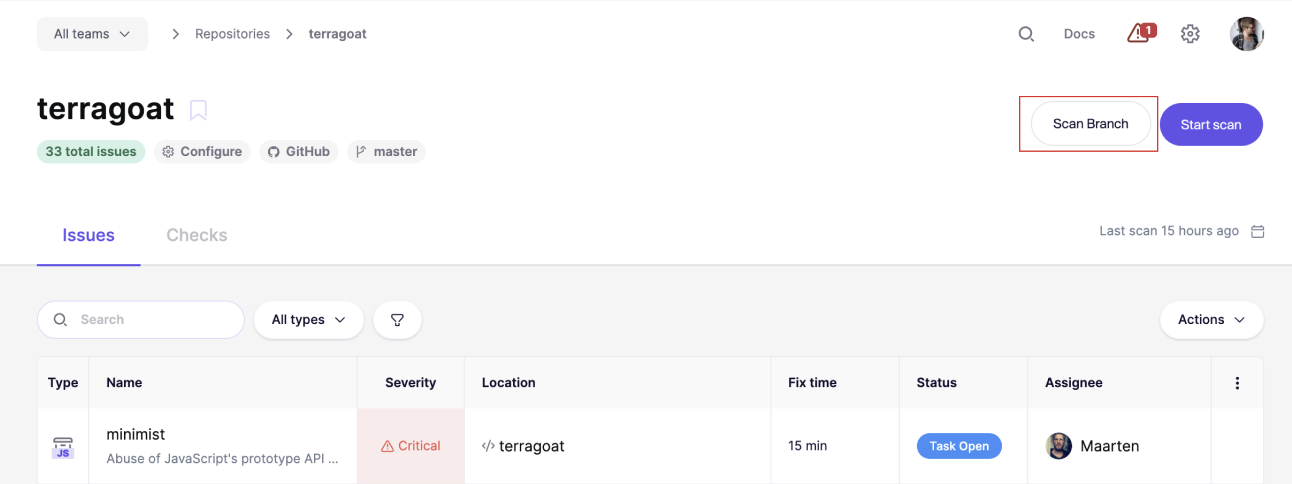
**Step 1**: Navigate to a specific repository detail page within Aikido

**Step 2**: Click on the Scan Branch button.\
​

![Repository dashboard showing critical security issues and scan options for the "terragoat" project.](/files/Rgq6sEedzAmfCDEf22ru)

**Step 3:** In the prompted field, enter the **name of the branch or tag** you wish to scan. Make sure to type the exact name of the branch / tag to avoid any errors. You can select which types of scans to execute.
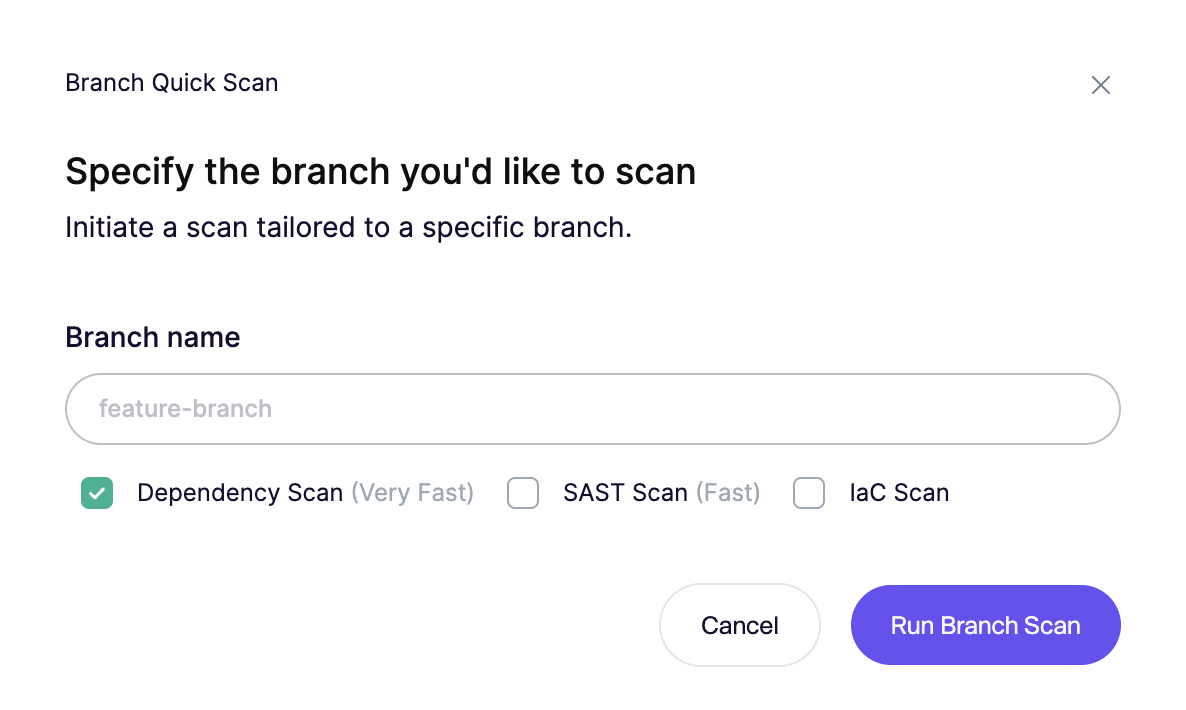
![Initiate a security scan for a specified code branch with scan type options.](/files/1slgJl6OtTVvVGpNNIBM)

**Step 4.** In the bottom right corner, you will be able to follow the progress of the scanning. Once the scanning is done, click 'View Diffs'\
​

![Scan completed notification with "View Diffs" button displayed for a demo application.](/files/iXTSZKBPbNjuBLjRJ9bR)

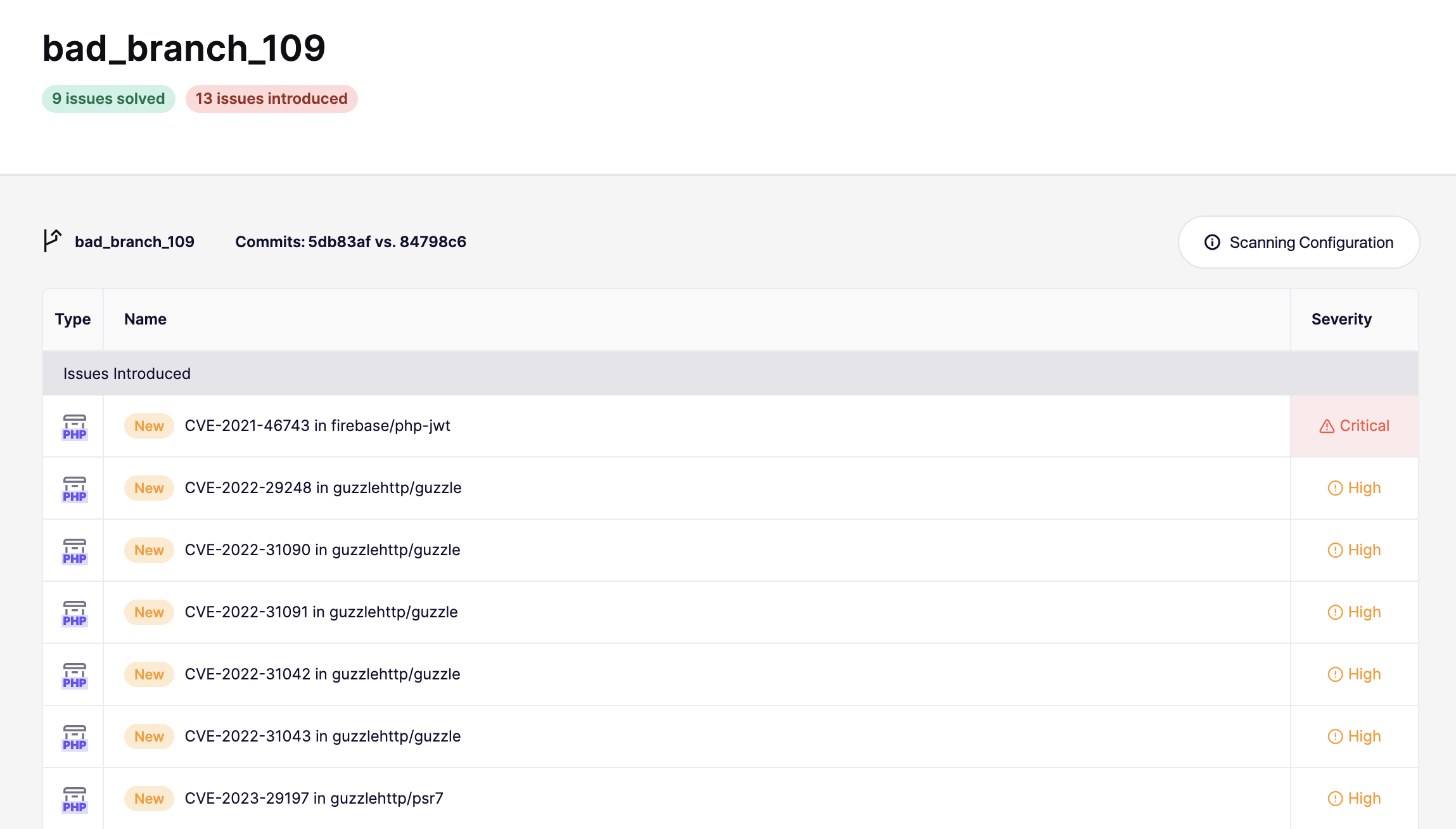
**Step 5.** Check which new issues are introduced and resolved on the comparison page.\
​

![Branch security scan summary showing newly introduced critical and high severity vulnerabilities.](/files/9FgHyjaEqvxDJEYzVKlO)

By following these steps, you can effectively conduct a manual scan of your branch/tag in Aikido, which will allow you to review changes, identify new or resolved issues, and make informed decisions about integrating the branch into your main codebase.

***


---

# Agent Instructions
This documentation is published with GitBook. GitBook is the documentation platform designed so that both humans and AI agents can read, navigate, and reason over technical content effectively. Learn more at gitbook.com.

## Querying This Documentation
If you need additional information that is not directly available in this page, you can query the documentation dynamically by asking a question.

Perform an HTTP GET request on the current page URL with the `ask` query parameter, and the optional `goal` query parameter:

```
GET https://help.aikido.dev/code-scanning/miscellaneous/support-for-specific-branch-scanning.md?ask=<question>&goal=<endgoal>
```

`ask` is the immediate question: it should be specific, self-contained, and written in natural language.
`goal` is optional and describes the broader end goal you are ultimately trying to accomplish on behalf of the user. GitBook uses it to tailor the answer towards what is most useful for that goal.

The response will contain a direct answer to the question and relevant excerpts and sources from the documentation.

Use this mechanism when the answer is not explicitly present in the current page, you need clarification or additional context, or you want to retrieve related documentation sections.