
Code Coverage
Upload test coverage from CI and track it per repository, file, and line in Aikido.
Code Coverage shows how much of your code your tests actually exercise. Run your test suite in CI, upload the report, and review coverage per repository, file, and line in Aikido. To fail a GitHub pull request when coverage is below a percentage you choose, see PR Gating on Code Coverage. In a monorepo, run and upload coverage for every app. To skip unchanged apps, see Monorepos That Test Only Changed Paths.
How it works
- Your CI job runs tests with coverage enabled and writes one or more coverage reports.
- Your CI uploads that report to Aikido. The step depends on your platform. See Upload a coverage report.
- Aikido stores the report against the repository, commit SHA, and branch.
- The Code Coverage tab shows the latest upload for that repository and branch. A new upload replaces the previous one. Files that are not in the new report are removed.
What Aikido measures
Aikido does not compare the uploaded report against every file in the repository. It only scores and lists the files that appear in the coverage report your CI uploaded.
That means:
- The Code Tree and File List show files from that report, not a full inventory of the repo.
- The repository coverage percentage is covered lines divided by total lines in that report.
- Files your test runner never instrumented do not appear as 0% uncovered. They are simply absent.
Aikido uses the connected repository to attach the upload to the right repo and to fetch source for line-level preview of files that are already in the report. It does not walk the repo to fill in files the report omitted.
You see the files your tests collected
The code tree and the coverage percentage follow the report. Test runners usually instrument only part of the repository. Jest collectCoverageFrom, pytest --cov=src, and Istanbul include often collect src/ and leave out tests, generated files, and other folders. Upload that report and Aikido shows src/. The percentage is covered lines divided by the lines in the report.
To show more of the repository, widen those collect or include paths and upload again. When packages or jobs each write a report, pass every path in one upload. Aikido merges LCOV and Cobertura reports in that upload into one result. A later upload does not keep files from an earlier one. Run every app on each commit. To skip apps that did not change, see Monorepos That Test Only Changed Paths.
Use cases
- See which repositories are under-tested: compare overall coverage across the repos connected to Aikido.
- Find gaps in a codebase: open a repository and browse uncovered files in the code tree or file list.
- Inspect a file before you change it: open line-level coverage against the source so you know what tests already cover.
- Track whether coverage is improving: use coverage over time as you add tests or clean up dead code.
- Pair coverage with quality work: when a repository scan or PR check flags a file, check whether that file is tested.
Prerequisites
Before you start, make sure:
- You're on a Basic, Pro, Advanced, or Enterprise plan. Code Coverage isn't available on the Developer plan.
- The repository is connected to Aikido.
- Your tests produce a coverage report. Aikido accepts LCOV (
lcov.info) and Cobertura XML. Jest and pytest-cov can write LCOV natively. Other runners work if they can export LCOV or Cobertura.
Upload a coverage report
After your tests write a coverage report, upload it with the integration for your CI platform. GitHub Actions, GitLab CI, Bitbucket Pipelines and Azure DevOps authenticate with OIDC, so those jobs do not need an API token. Jenkins, CircleCI, and other custom CI use the CI API client with a CI API token.
Each guide covers the upload step, multiple reports, parallel or matrix jobs, regions, and every input:
- GitHub Actions: Aikido Code Coverage GitHub Action
- GitLab CI: Aikido Code Coverage GitLab CI component
- Bitbucket Pipelines: Aikido Code Coverage Bitbucket pipe
- Azure DevOps: Aikido Code Coverage Azure Pipeline
- Custom CI: Aikido CI API client for Jenkins, CircleCI, and other runners
View coverage in Aikido
After the next successful upload:
- Open Code Quality > Code Coverage.
- Search the repository list. Each row shows overall coverage and when it was last updated.
- Open a repository to see:
- Coverage summary: covered, partial, and uncovered line counts
- Coverage over time: how the percentage changes across uploads
- Files: browse as a Code Tree or a flat File List
- Open a file to inspect line-level coverage against the source.
Source preview depends on Aikido having imported the file. If the source isn't available yet, coverage percentages still show in the file list.
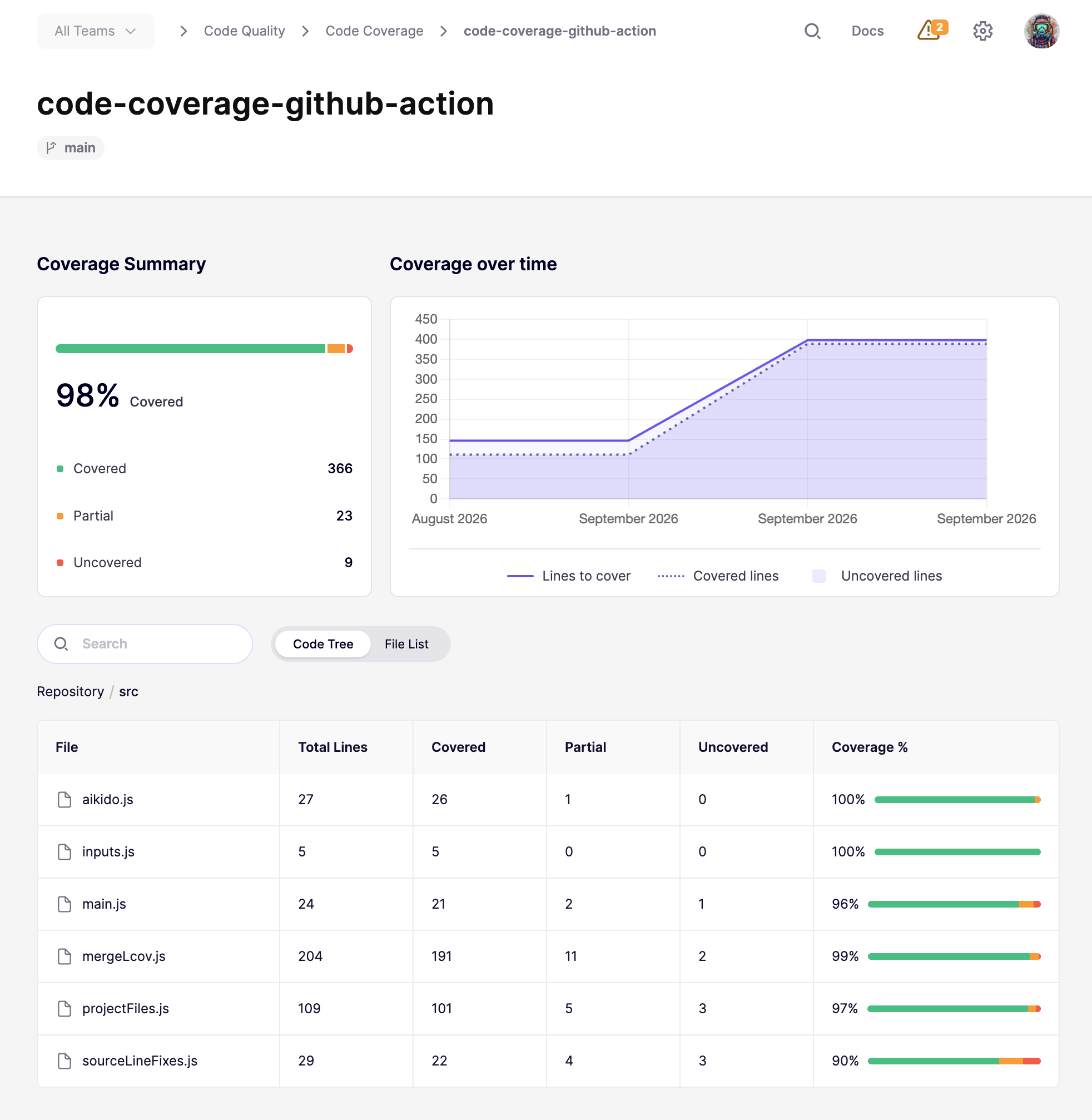
Code Coverage shows repository-level trends and file-by-file coverage in one view.
Troubleshooting
- Nothing appears in Aikido: confirm the repository is connected to Aikido, the coverage report contains at least one parseable source file, and the upload step ran.
- You only see
/src(or another folder): the uploaded report only contains those paths. See You see the files your tests collected. - Coverage looks incomplete: if you shard tests or use a matrix, send every report in one upload per commit. Pass every report path, or collect the artifacts first and upload them together.
- Apps that did not run disappeared: the latest upload replaced the previous one. Run every app and upload every report. To skip unchanged apps, keep each app's latest report and upload them together. See Monorepos That Test Only Changed Paths.
- The report is rejected as too large: Aikido accepts coverage payloads up to 10 MB. Narrow the coverage output or exclude generated files before upload.
- The upload step fails: follow the guide for your platform in Upload a coverage report.
Need help?
Open the Intercom chat in the bottom right corner. Our team is here to help.