> For the complete documentation index, see [llms.txt](https://help.aikido.dev/llms.txt). Markdown versions of documentation pages are available by appending `.md` to page URLs; this page is available as [Markdown](https://help.aikido.dev/docs/docs-ja/zen-firewall/zen-installation-instructions/proxy-load-balancer-settings.md).

# プロキシとロードバランサーの設定

## プロキシとクライアントのIPアドレス <a href="#proxy--clients-ip-address" id="proxy--clients-ip-address"></a>

自動的に `x-forwarded-for` ヘッダーを使用して、プロキシの背後にある場合のクライアントのIPアドレスを判定します。

ロードバランサーのない状態でサーバーを公開している場合は、 `AIKIDO_TRUST_PROXY` 環境変数を `false` に設定して、正しいIPアドレスが使用されるようにしてください。そうしないと、上記のヘッダーを追加することでIPアドレスを偽装し、レート制限を回避される可能性があります。

クライアントのIPアドレスを判定するために別のヘッダーを使用する必要がある場合は、 `AIKIDO_CLIENT_IP_HEADER` 環境変数にそのヘッダー名を設定できます。これにより、既定の `x-forwarded-for` ヘッダーが上書きされます:

{% hint style="warning" %}
`AIKIDO_CLIENT_IP_HEADER` は現在、Node.js、Java、Pythonでのみサポートされています
{% endhint %}

```bash
# DigitalOcean App Platform の例
AIKIDO_CLIENT_IP_HEADER=do-connecting-ip node app.js
```

## レート制限とロードバランサー <a href="#rate-limiting--load-balancers" id="rate-limiting--load-balancers"></a>

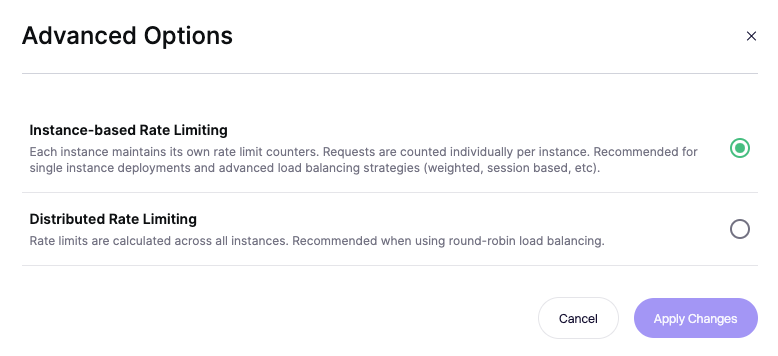
既定では、各 Zen インスタンスはそれぞれ独自のレート制限カウンターを保持します。つまり、アプリケーションのインスタンスが3つあり、レート制限を1分あたり10回に設定した場合、理論上、顧客は30リクエスト（サーバーごとに10回）を送信できることになります。

ラウンドロビンのロードバランシングの場合、Aikido はインスタンス数に基づいてレート制限を計算できます。上の例では、顧客は設定どおり最大10リクエストを送信できることになります。

このオプションは、特定の Zen アプリを表示しているときに、「Routes」タブの「Advanced Options」で見つけることができます。

![レート制限の設定オプション: インスタンスベースと分散型。インスタンスベースが選択されています。](/files/39cd421279d4b22e128a87d6f7bdffbb41b5b30d)

## ASP.NET Core の追加設定 <a href="#additional-configuration-for-aspnet-core" id="additional-configuration-for-aspnet-core"></a>

[ASP.NET](http://asp.net) Core は自動的には検出しません `x-forwarded-for` 追加設定なしでは。詳細については [Microsoft のドキュメント](https://learn.microsoft.com/en-us/aspnet/core/host-and-deploy/proxy-load-balancer?view=aspnetcore-9.0\&preserve-view=true).


---

# Agent Instructions
This documentation is published with GitBook. GitBook is the documentation platform designed so that both humans and AI agents can read, navigate, and reason over technical content effectively. Learn more at gitbook.com.

## Querying This Documentation
If you need additional information that is not directly available in this page, you can query the documentation dynamically by asking a question.

Perform an HTTP GET request on the current page URL with the `ask` query parameter, and the optional `goal` query parameter:

```
GET https://help.aikido.dev/docs/docs-ja/zen-firewall/zen-installation-instructions/proxy-load-balancer-settings.md?ask=<question>&goal=<endgoal>
```

`ask` is the immediate question: it should be specific, self-contained, and written in natural language.
`goal` is optional and describes the broader end goal you are ultimately trying to accomplish on behalf of the user. GitBook uses it to tailor the answer towards what is most useful for that goal.

The response will contain a direct answer to the question and relevant excerpts and sources from the documentation.

Use this mechanism when the answer is not explicitly present in the current page, you need clarification or additional context, or you want to retrieve related documentation sections.