> For the complete documentation index, see [llms.txt](https://help.aikido.dev/llms.txt). Markdown versions of documentation pages are available by appending `.md` to page URLs; this page is available as [Markdown](https://help.aikido.dev/docs/docs-ja/zen-firewall/zen-features/blocking-users-with-zen-firewall.md).

# Zen Firewall でユーザーを追跡

Aikido の Zen Firewall は、不要なユーザーや攻撃を引き起こすユーザーを識別してブロックする方法を提供し、悪意のあるアクティビティを防ぐことでアプリのセキュリティを強化します。

### ユースケース <a href="#use-cases" id="use-cases"></a>

* 🔍 **アクティブユーザーを監視中：** ユーザーのアクティビティを追跡して、潜在的な脅威を特定し対応します。
* 🛡️ **悪意のあるユーザーをブロック**: セキュリティイベントを発生させたユーザーからのアクセスを防止

### ユーザーを識別する方法 <a href="#how-to-identify-and-block-users" id="how-to-identify-and-block-users"></a>

**ステップ 1:** 提供されているインストール手順を使用して、Aikido ミドルウェアを設定します。

{% content-ref url="/pages/38bd843dd9341a36ea2aa586595c2f04a98920fb" %}
[Zen Firewall のインストール](/docs/docs-ja/zen-firewall/zen-installation-instructions.md)
{% endcontent-ref %}

**ステップ 2:** 次を使用してください `setUser` アプリケーションのコンテキストで現在のユーザーを指定するための関数。

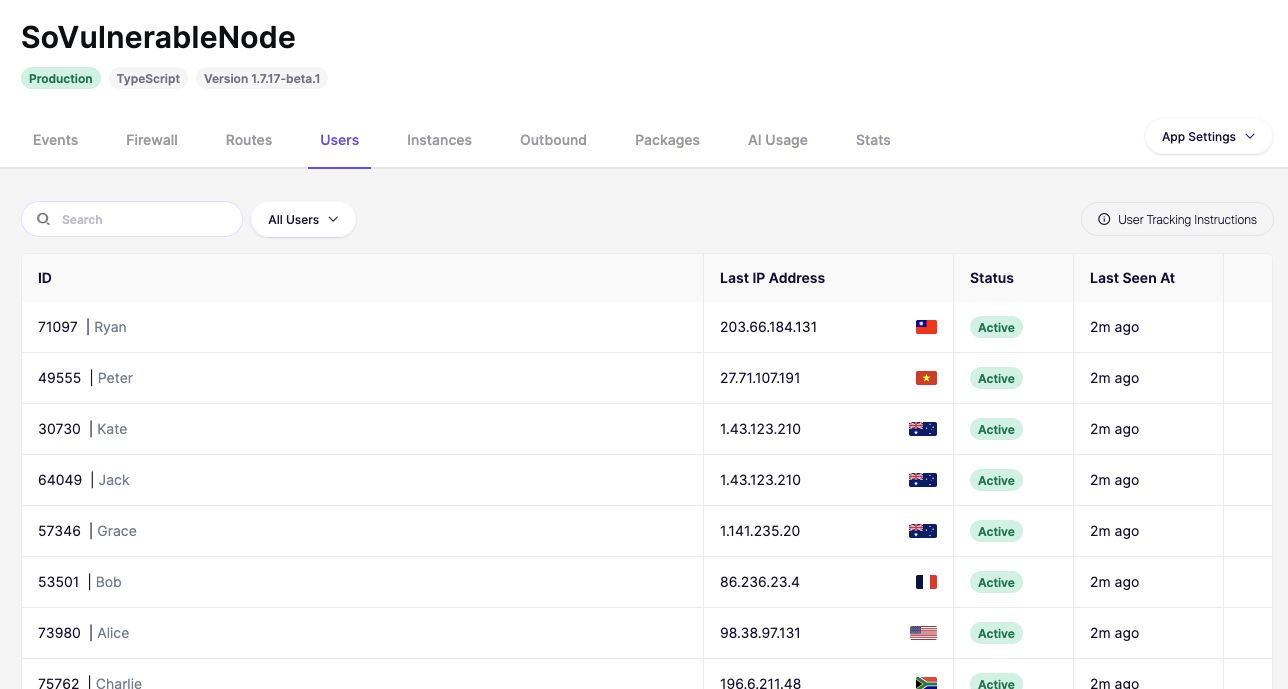
設定すると、Aikido はダッシュボードにすべてのアクティブユーザーを表示します。

![デモアプリのユーザー状態と最終アクティビティを表示するユーザー管理ダッシュボード。](/files/ce2bda0909c4f2cd689226c80129f819652540fc)

**ステップ 2:** ブロックするユーザーを特定し、三点リーダーをクリックしてアクションメニューを開きます。
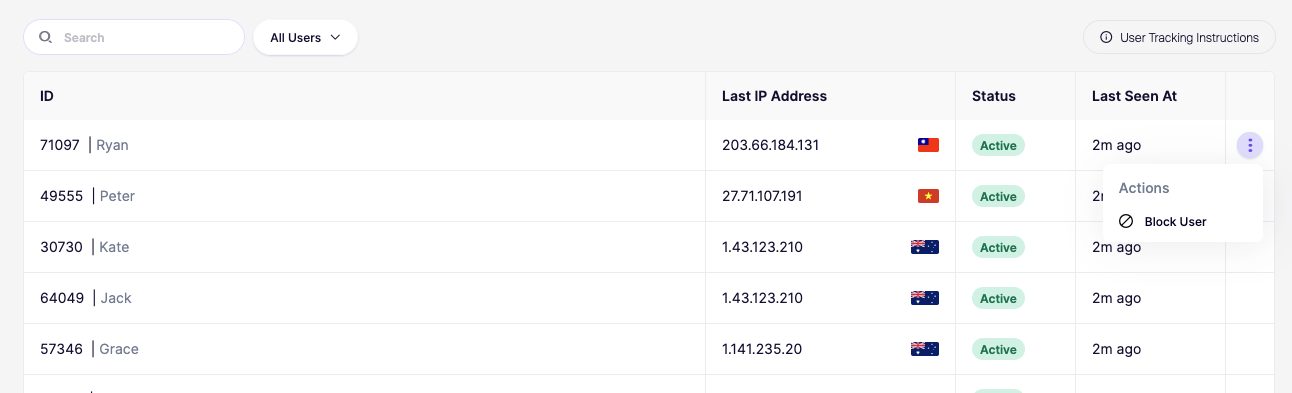
![ユーザーをブロックするメニューオプションを含む、「アクティブ」ステータスを表示するユーザー管理テーブル。](/files/c7206f7caafd125b44f44d8c8c1e7dc5ed9fe5b3)

{% hint style="info" %}
ユーザーブロックは即時ではないことに注意してください。ブロックが有効になるまで最大1分かかります。
{% endhint %}

## 機能 <a href="#privacy--gdpr" id="privacy--gdpr"></a>

<figure><img src="/files/6c61bceebc5ac6235a5478704a7ab869e06c2d94" alt=""><figcaption></figcaption></figure>

### ユーザーをブロック

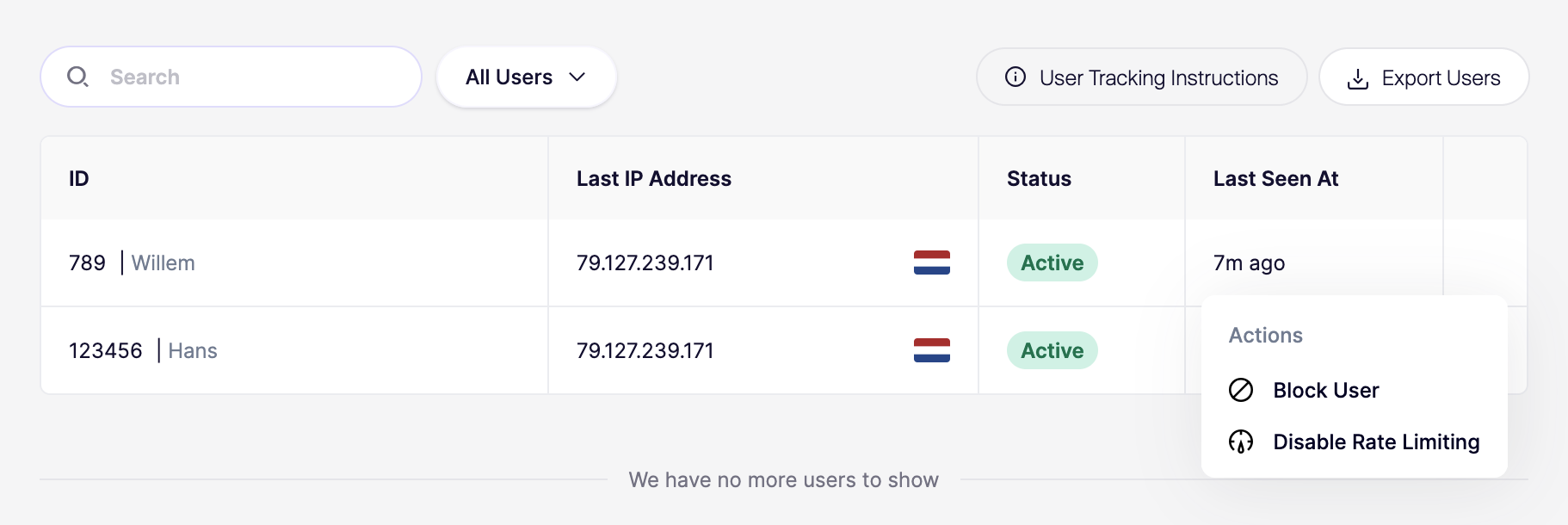
ユーザーのアクションメニューをクリックし、「ユーザーをブロック」アクションを使用することで、そのユーザーによるアプリケーションへのアクセスを永続的にブロックできます。

### レート制限を解除

ユーザーのアクションメニューをクリックし、「レート制限を無効化」アクションを使用することで、特定のユーザーのレート制限を無効にします。これにより無効化されます **すべて** この特定のユーザーのすべてのレート制限。

## プライバシーと GDPR <a href="#privacy--gdpr" id="privacy--gdpr"></a>

ユーザー名の送信は任意ですが、ダッシュボードでユーザーを識別するのに役立ちます。個人を特定できる情報（PII）を共有する場合は、Aikido Security をサブプロセッサーとして記載する必要があります。


---

# Agent Instructions
This documentation is published with GitBook. GitBook is the documentation platform designed so that both humans and AI agents can read, navigate, and reason over technical content effectively. Learn more at gitbook.com.

## Querying This Documentation
If you need additional information that is not directly available in this page, you can query the documentation dynamically by asking a question.

Perform an HTTP GET request on the current page URL with the `ask` query parameter, and the optional `goal` query parameter:

```
GET https://help.aikido.dev/docs/docs-ja/zen-firewall/zen-features/blocking-users-with-zen-firewall.md?ask=<question>&goal=<endgoal>
```

`ask` is the immediate question: it should be specific, self-contained, and written in natural language.
`goal` is optional and describes the broader end goal you are ultimately trying to accomplish on behalf of the user. GitBook uses it to tailor the answer towards what is most useful for that goal.

The response will contain a direct answer to the question and relevant excerpts and sources from the documentation.

Use this mechanism when the answer is not explicitly present in the current page, you need clarification or additional context, or you want to retrieve related documentation sections.