> For the complete documentation index, see [llms.txt](https://help.aikido.dev/llms.txt). Markdown versions of documentation pages are available by appending `.md` to page URLs; this page is available as [Markdown](https://help.aikido.dev/docs/docs-ja/zen-firewall/zen-features/blocking-bot-traffic-with-zen-firewall.md).

# Zen Firewall でボットトラフィックをブロック

AikidoのZen Firewallは、アプリケーションにアクセスするさまざまな種類の自動化トラフィックを特定してブロックするのに役立ちます。この機能は、望ましくないボットの活動を制御できるようにすることで、セキュリティ対策を強化します。

> **重要**: ボットのブロックは、全体の「[ブロック/検出モード](/docs/docs-ja/zen-firewall/zen-features/blocking-vs-detection-mode-in-zen-firewall.md)」設定とは独立して動作します。ボットブロックを有効にすると、Zen が検出モードであっても常に適用されます。

## ユースケース <a href="#use-cases" id="use-cases"></a>

* 🛡️ **サーバーリソースを保護**: ボットが大量のリクエストでインフラを圧倒するのを防止
* 💰 **コストを削減**: 不要なボットトラフィックをブロックして、帯域幅とコンピューティングの費用を抑える
* 🔒 **コンテンツを保護**: 自動スクレイピングやコピーから知的財産を守る
* ⚡ **パフォーマンスを向上**: ボット関連のサーバー負荷を減らしてサイトの速度を向上させる

## 検出するボットのカテゴリ <a href="#bot-categories-we-detect" id="bot-categories-we-detect"></a>

Aikido は自動化トラフィックをわかりやすいカテゴリに分類するため、ブロック、許可、監視の判断ができます。特定のユーザーエージェントの完全な一覧は、 [専用のボット一覧ページで](/docs/docs-ja/zen-firewall/miscellaneous/bot-protection-details.md).

利用可能なカテゴリの種類の例：

* **検索・発見ボット**\
  従来の検索エンジン、広告クローラー、SEOツール、ソーシャルメディアボット、メッセンジャーのプレビュークローラーを含みます。これらのボットは、検索、広告、共有のためにコンテンツをインデックス化、分析、またはプレビューします。
* **AIクローラー＆アシスタント**\
  AI検索クローラー、AIデータスクレイパー、生成AIシステムを動かしたりユーザーの問い合わせに応答したりするためにコンテンツを閲覧・抽出するAIアシスタントを含みます。
* **アーカイブ＆監視サービス**\
  Webアーカイバーや、定期的にページへアクセスする稼働監視・パフォーマンス監視ツールを含みます。
* **セキュリティ＆悪用ツール**\
  脆弱性スキャナー、データ収集ツール、ヘッドレスブラウザ、その他、調査、スクレイピング、悪用によく使われる自動化ツールを含みます。

{% hint style="info" %}
**ヒント**: ブロックするボットカテゴリは慎重に検討してください。正規のサービス（Google の検索クローラーなど）の中には、サイトの機能に必要なものもあります。
{% endhint %}

## ボットトラフィックをブロックする方法 <a href="#how-to-block-bot-traffic" id="how-to-block-bot-traffic"></a>

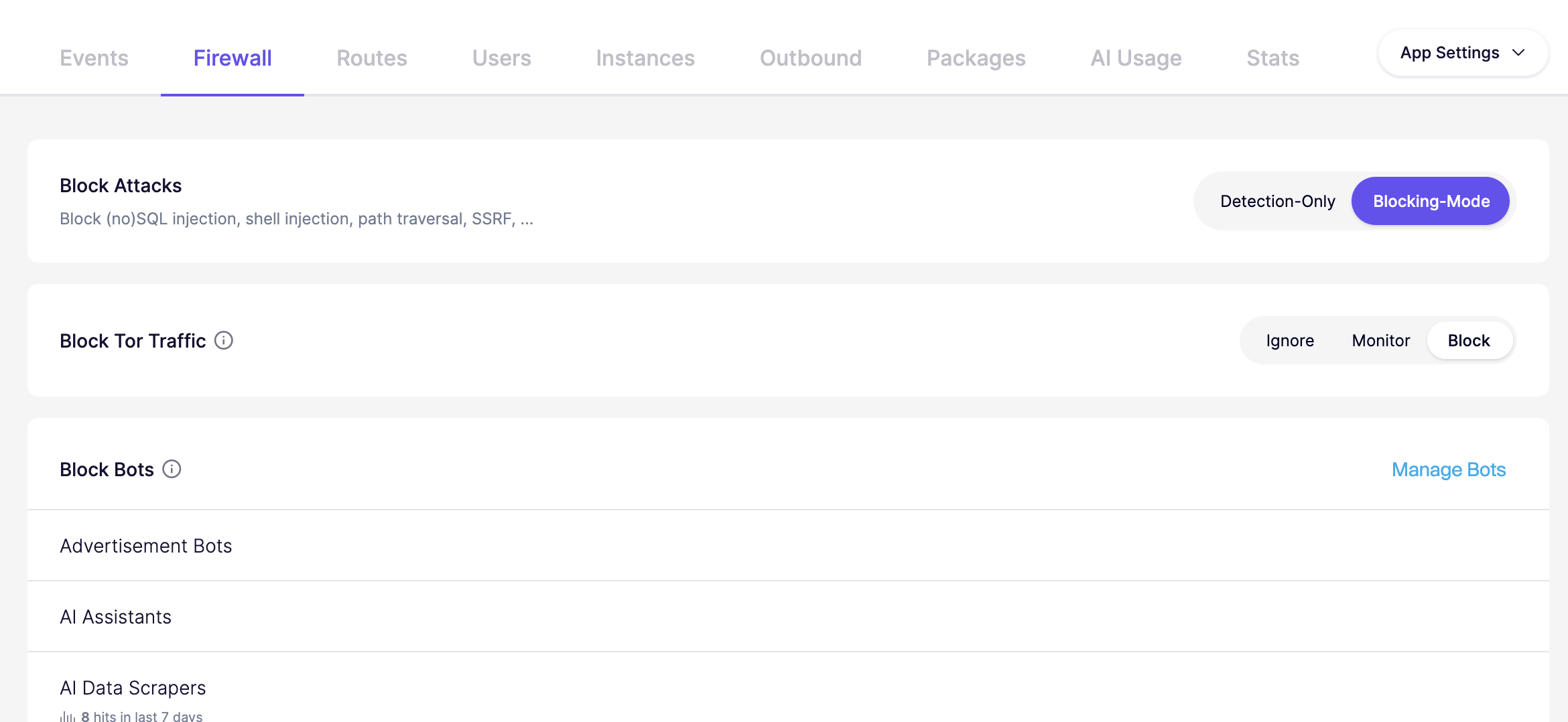
特定のアプリを選択し、 **ファイアウォール** タブへ進みます。「**ボットを管理**」の横にある「**ボットを管理**」でボットブロックを設定します。

![デモアプリの攻撃、Torトラフィック、ボットブロックのオプションを表示するファイアウォール設定画面。](/files/105851788fca1d111f684124487fa6e241171c26)

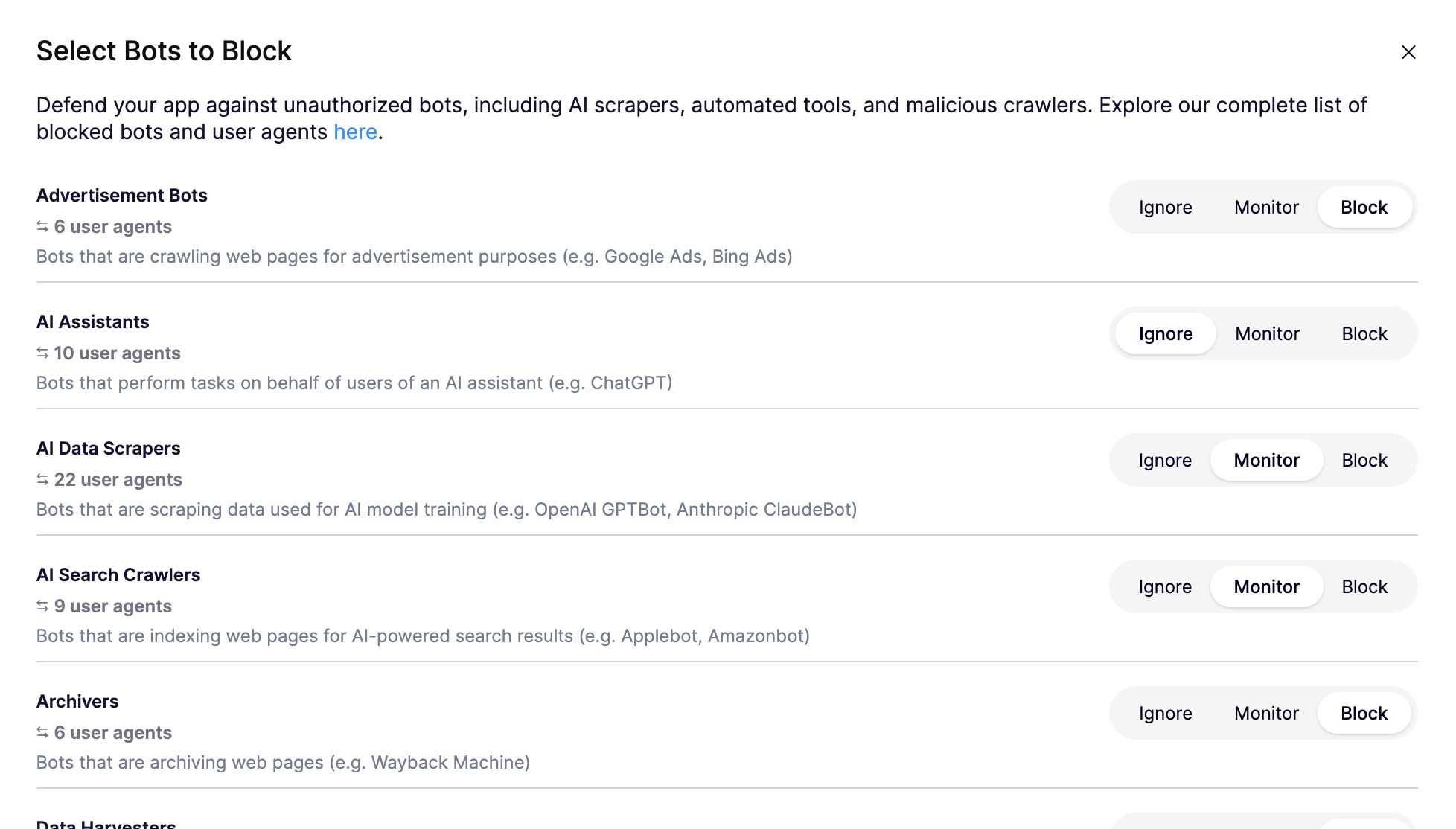
次を使用してください **ボット** ビューで、無視、監視、またはブロックするボットの種類を選択し、「**ボットを更新**」をクリックして完了します。

![特定のボットがアプリにアクセスするのを選択してブロックするためのインターフェース。](/files/26ff8aaae8144fef2303d8542570414de07d248d)

{% hint style="info" %}
ボットブロックは即時ではなく、ブロックが有効になるまで最大1分かかることに注意してください。
{% endhint %}


---

# Agent Instructions
This documentation is published with GitBook. GitBook is the documentation platform designed so that both humans and AI agents can read, navigate, and reason over technical content effectively. Learn more at gitbook.com.

## Querying This Documentation
If you need additional information that is not directly available in this page, you can query the documentation dynamically by asking a question.

Perform an HTTP GET request on the current page URL with the `ask` query parameter, and the optional `goal` query parameter:

```
GET https://help.aikido.dev/docs/docs-ja/zen-firewall/zen-features/blocking-bot-traffic-with-zen-firewall.md?ask=<question>&goal=<endgoal>
```

`ask` is the immediate question: it should be specific, self-contained, and written in natural language.
`goal` is optional and describes the broader end goal you are ultimately trying to accomplish on behalf of the user. GitBook uses it to tailor the answer towards what is most useful for that goal.

The response will contain a direct answer to the question and relevant excerpts and sources from the documentation.

Use this mechanism when the answer is not explicitly present in the current page, you need clarification or additional context, or you want to retrieve related documentation sections.