> For the complete documentation index, see [llms.txt](https://help.aikido.dev/llms.txt). Markdown versions of documentation pages are available by appending `.md` to page URLs; this page is available as [Markdown](https://help.aikido.dev/docs/docs-ja/zen-firewall/zen-features/monitor-outbound-domains.md).

# 送信先ドメインを監視

Aikido の Zen Firewall では、送信先のドメインと IP アドレスを監視できます。

### ユースケース <a href="#use-cases" id="use-cases"></a>

* **シャドー IT の検出:** 開発者が、意図的または無意識のうちに本番データを第三者と共有しているか（例 [api.openai.com](http://api.openai.com) )
* **個人識別情報（PII）の漏えい**: PII や機密データが第三者に誤って漏えいするのを防ぎます
* **コンプライアンス:** 既存のデータストリームをコンプライアンス向けにマッピングします。

> Zen をセットアップすると、送信先ドメインの監視は **すぐに使えます。**

### 今後の予定 <a href="#future" id="future"></a>

* 特定の送信先ドメインをブロックして、アプリを SSRF から保護します
* 未承認の第三者サービスへの PII 漏えい

### 送信先ドメインを監視する方法 <a href="#how-to-monitor-your-outbound-domains" id="how-to-monitor-your-outbound-domains"></a>

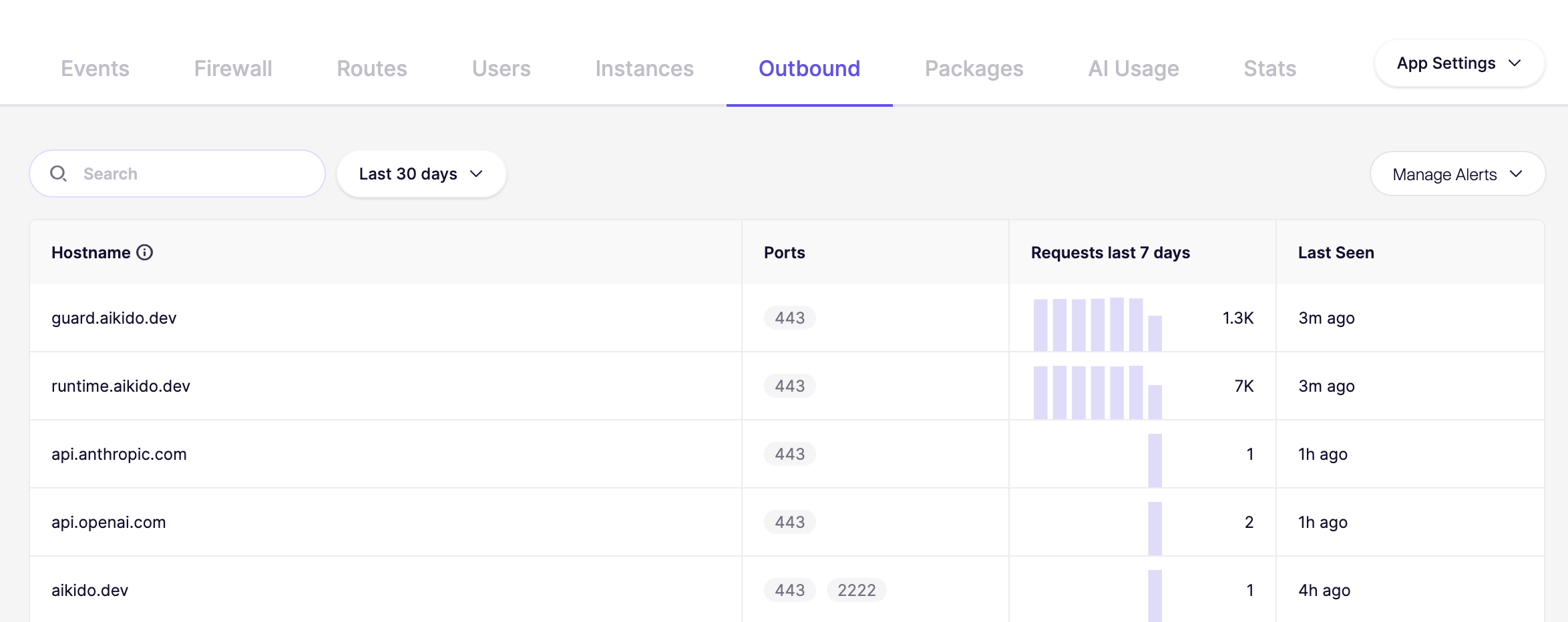
特定のアプリを選択し、送信先ドメインタブに進みます。すべての送信先ドメインの完全な概要が表示されます。

![ホスト名、ポート、最終検出時刻を表示するデモアプリの送信先ドメイン表。](/files/cd2632f22b2012f78180453ec218f3e6622504a0)

### 新しい送信先ドメインが検出されたときに通知を受け取る <a href="#get-notified-when-new-outbound-domains-were-detected" id="get-notified-when-new-outbound-domains-were-detected"></a>

アプリが新しい外部宛先に接続するタイミングを知ることは、セキュリティと監視のために非常に重要です。アプリケーションがこれまで接続したことのないホスト名へ送信接続を行うたびにアラートを受け取れます。

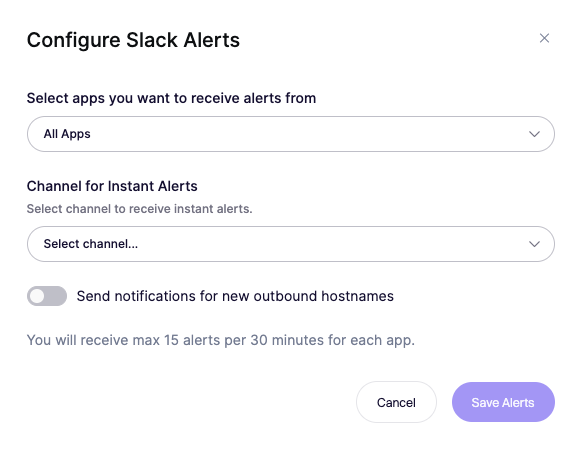
これらのアラートを受け取るには、 [**サービス概要**](https://app.aikido.dev/runtime/services) に移動し、 **アラートを管理** に移動し、設定 **「新しい送信先ホスト名の通知を送信する」** を見つけて有効にします。同じページで、どのアプリがこれらのアラートを発生させるかを細かく調整し、希望する Slack または Microsoft Teams のチャンネルを選択することもできます。

![アプリ、チャンネル、通知設定を選んで Slack アラートを構成し、即時通知を受け取ります。](/files/bd9133ca9c000c360c33f3e341821d7c705ebf6f)


---

# Agent Instructions
This documentation is published with GitBook. GitBook is the documentation platform designed so that both humans and AI agents can read, navigate, and reason over technical content effectively. Learn more at gitbook.com.

## Querying This Documentation
If you need additional information that is not directly available in this page, you can query the documentation dynamically by asking a question.

Perform an HTTP GET request on the current page URL with the `ask` query parameter, and the optional `goal` query parameter:

```
GET https://help.aikido.dev/docs/docs-ja/zen-firewall/zen-features/monitor-outbound-domains.md?ask=<question>&goal=<endgoal>
```

`ask` is the immediate question: it should be specific, self-contained, and written in natural language.
`goal` is optional and describes the broader end goal you are ultimately trying to accomplish on behalf of the user. GitBook uses it to tailor the answer towards what is most useful for that goal.

The response will contain a direct answer to the question and relevant excerpts and sources from the documentation.

Use this mechanism when the answer is not explicitly present in the current page, you need clarification or additional context, or you want to retrieve related documentation sections.